


Best Wallets for Solana in 2026

The best Solana wallet in 2026 depends on what you need it to do. Phantom and Solflare suit Solana-first use, Ledger adds hardware-backed signing, Backpack combines self-custody with broad hardware-wallet options, and FoxWallet or OKX Wallet can make more sense when Solana is part of a wider multi-chain portfolio.
A useful Solana wallet should let you manage SOL and SPL tokens, review transactions clearly, connect to the applications you use and recover access safely if a device is lost. Beyond that, the right choice depends on whether you prioritize mobile access, browser-based DApps, native SOL staking, NFTs, hardware signing or cross-chain activity.
This guide compares FoxWallet, Phantom, Solflare, Ledger, Backpack and OKX Wallet by those practical differences. It is not a universal ranking: each wallet has a different platform model, security boundary and best-fit workflow.
Best Solana wallet 2026 criteria: What actually matters?
A Solana wallet manages the keys used to authorize transactions. SOL and tokens remain recorded on the blockchain; they are not stored inside the wallet app itself. SOL is Solana's native asset, while SPL tokens are assets issued through Solana token programs. Solana's official guide provides a useful overview of SOL and tokens on Solana.
Before choosing a crypto wallet for Solana, compare the following:
| Selection factor | Why it matters |
|---|---|
| Custody and recovery | A self-custody wallet gives you control of the keys, but you are responsible for protecting the recovery method. |
| SOL and SPL token support | The wallet needs to display and transfer the Solana assets you actually use, including Token-2022 assets where relevant. |
| Platform | Mobile apps, browser extensions, web wallets and hardware devices support different workflows. Do not assume features are identical across platforms. |
| DApp connectivity | A wallet connection lets you review and sign requests from compatible Solana applications; it does not mean the wallet endorses the DApp. |
| Staking | Native SOL delegation, liquid staking and third-party DeFi products are different mechanisms with different risks. |
| Swaps and bridging | Same-chain swaps exchange Solana assets; cross-chain routes move value between ecosystems and add more execution dependencies. |
| NFT handling | Collectors may need clear collection views, transaction previews and protection against suspicious requests. |
| Hardware support | Hardware signing keeps private keys away from an internet-connected phone or computer, but users still need to verify what they approve. |
| Transaction review | Clear recipient, token, network, route, slippage and approval details reduce avoidable errors. |
If custody is the first decision, FoxWallet's guide to custodial vs non-custodial wallets explains how account recovery and key control differ.
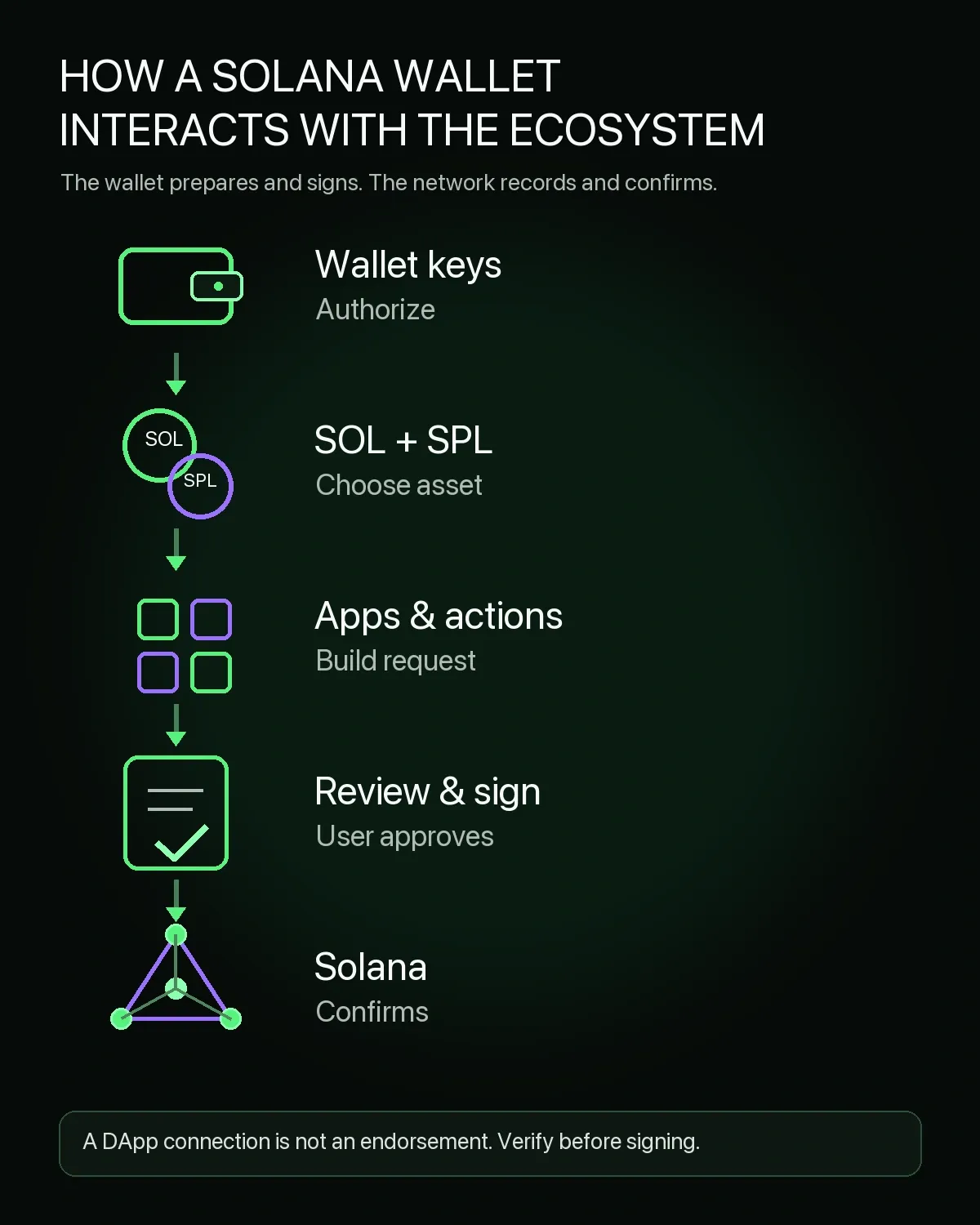
A wallet manages keys and presents transaction requests. The Solana network records assets and confirms valid signed transactions.
Best Solana wallet 2026 comparison: Top wallets by feature
The six options below include Solana-specialist wallets, multi-chain software wallets and a hardware-based setup. The comparison focuses on current, documented capabilities rather than assigning arbitrary scores.
| Wallet | Best-fit use case | Platforms | Solana-relevant strengths | Hardware support | Key limitation |
|---|---|---|---|---|---|
| FoxWallet | Mobile users managing Solana within a wider multi-chain portfolio | iOS and Android for the Solana capabilities discussed here | Self-custody, SOL/SPL asset management, mobile DApps, Solana swaps through 1inch and bridging through LI.FI | Not the main use case | Solana capability should not be inferred for the separate browser extension |
| Phantom | General Solana use with a familiar Solana-first workflow | iOS, Android and Chrome extension | SOL/SPL assets, NFTs, DApps, swaps, cross-chain swaps and SOL staking | Ledger on supported mobile devices and the extension | Supports several networks, but not every EVM chain |
| Solflare | Solana-focused DeFi, staking and mobile use | iOS, Android, web wallet and extension | SOL/SPL assets, NFTs, in-app DApps, swaps and native SOL staking | Ledger, Keystone and Solflare Shield options | Primarily designed around the Solana ecosystem |
| Ledger | Long-term holdings and hardware-backed transaction signing | Ledger device with Ledger Wallet on desktop or mobile | SOL and SPL management, transaction confirmation on the device and SOL staking | The product is the hardware signer | Less convenient for frequent, low-value interactions than a software-only wallet |
| Backpack | Self-custody users who want Solana plus several hardware-wallet choices | iOS, Android and browser extension | Solana assets, swaps, staking, NFTs, DApps and multisig features | Ledger, Trezor and Keystone | Wallet and exchange are separate products with different custody models |
| OKX Wallet | Multi-chain Web3 users already using the OKX wallet ecosystem | iOS, Android and browser extension | Solana support, DApps, multi-chain/cross-chain DEX tools and NFT access | Hardware-wallet setup is available in the extension | Feature availability can vary by platform and region |
The short version is straightforward:
- Choose Phantom or Solflare when a Solana-native experience is the main priority.
- Choose FoxWallet when you want to manage Solana from mobile alongside many other supported networks and use confirmed mobile swap, bridge and DApp functions.
- Choose Ledger when hardware-backed key isolation matters more than day-to-day convenience.
- Choose Backpack when you want a self-custodial wallet with several hardware-wallet connection options.
- Choose OKX Wallet when Solana is one part of a broad multi-chain Web3 workflow.
Swaps deserve their own comparison. A wallet interface may use an aggregator or route transactions through external liquidity, and results change with the token pair, trade size and market conditions. For that narrower intent, see the guide to DEX aggregators for Solana.
Best Solana wallet 2026 pick for multi-chain users: FoxWallet
FoxWallet is a practical fit when SOL is one part of a wider self-custody portfolio. Its current mobile product supports Solana alongside many other networks, allowing users to manage assets and connect to compatible DApps without maintaining a separate wallet for every ecosystem.
The important platform boundary is mobile. The Solana capabilities discussed here refer to the FoxWallet iOS and Android apps. They should not be projected onto FoxWallet's separate browser extension.
Why FoxWallet fits Solana users
FoxWallet's verified mobile capabilities include:
- Solana wallet support for managing SOL and SPL assets;
- local encrypted storage of mnemonic phrases and private keys;
- mobile DApp connectivity and a Discover browser;
- a dedicated NFT view, with asset visibility dependent on supported networks and standards;
- Solana swaps through 1inch;
- Solana bridging through LI.FI;
- phishing protection, transaction-risk prompts and contract-recognition features.
Those features make FoxWallet most relevant to mobile users who move between Solana and other supported ecosystems. A user can keep a unified view of assets while still checking the source and destination networks before a swap or bridge. Cross-chain convenience does not remove route, smart-contract, liquidity or destination-chain risk, so the transaction details still need to be reviewed before signing.
FoxWallet is not positioned here as the most Solana-native wallet or as a replacement for a hardware signer. Its role in this comparison is narrower: a self-custody mobile option for users who want Solana support within a broader multi-chain setup.
Where FoxWallet is not trying to compete directly
Phantom and Solflare provide more Solana-specialist workflows. Ledger is designed around hardware-backed signing. Backpack offers a different mix of wallet features and hardware connections. FoxWallet's strength is mobile multi-chain access rather than winning every Solana category.
That distinction matters when choosing between a specialist and a generalist wallet:
| If you mainly need... | Start by comparing... |
|---|---|
| Solana-first DApps and everyday use | Phantom and Solflare |
| Native SOL staking | Phantom, Solflare and Ledger |
| Hardware-backed signing | Ledger, plus compatible software-wallet connections |
| Mobile Solana plus broader multi-chain management | FoxWallet and OKX Wallet |
| Several hardware-wallet connection options | Backpack |
For a broader comparison of staking interfaces and custody models, use FoxWallet's guide to the best crypto wallets for staking rather than treating a wallet's DApp access as proof of native staking support.
Best Solana wallet 2026 choices by use case
The following use cases preserve the most useful way to narrow the shortlist.
Best for beginners: Phantom or FoxWallet
Phantom is a natural starting point for someone focused primarily on Solana. It supports iOS, Android and a Chrome extension, and Solana is always active in the wallet. The interface covers tokens, NFTs, apps, swaps and staking without requiring a user to start from a general multi-chain dashboard.
FoxWallet can make more sense for a beginner who already expects to use several networks from a phone. Its advantage is not greater Solana specialization; it is the ability to keep Solana inside a mobile multi-chain wallet. New users should still begin with a small transfer and confirm the address, network and token before moving a larger amount.
Best for Solana-only DeFi users: Solflare or Phantom
Solflare is a non-custodial Solana wallet with mobile apps, a web wallet and browser extension. Its documented functions include an in-app browser, swaps, NFTs and SOL staking. Solflare also supports Ledger and Keystone connections and offers its own NFC-based Shield hardware wallet for mobile signing.
Phantom is the other strong Solana-first choice. It supports same-chain and cross-chain swaps, compatible apps, NFTs and SOL staking. Current Phantom documentation also lists Ledger support in the browser extension and on supported mobile Ledger models. The best choice between the two often comes down to interface preference, hardware setup and the specific DApps a user needs.
Best for long-term SOL storage: Ledger
Ledger's Solana wallet documentation confirms support for managing SOL and SPL tokens through a Ledger device paired with the Ledger Wallet app. Transactions are signed with keys held by the hardware device, and SOL staking is available through the app's supported services.
Hardware signing reduces the online exposure of private keys, but it does not make every transaction safe. A user can still approve a malicious request, misread an address or mishandle the recovery phrase. The device screen and transaction details remain part of the security process.
Best for self-custody features and hardware-wallet choice: Backpack
Backpack Wallet is a self-custodial wallet available on mobile and as a browser extension. Its current documentation lists Solana alongside other supported networks and covers token transfers, swaps, staking, NFTs, DApp connections and multisig protection. Backpack also documents connections for Ledger, Trezor and Keystone hardware wallets.
The useful distinction is between Backpack Wallet and Backpack Exchange. The wallet is a self-custodial product; an exchange account has a different custody and account model. Readers should make sure they are using the product that matches their intended control over keys.
Best for multi-chain and cross-chain users: FoxWallet or OKX Wallet
FoxWallet and OKX Wallet both support mobile and multi-chain workflows, but they are not identical. FoxWallet's confirmed Solana functions in this article are mobile-specific and include 1inch-powered swaps, LI.FI-powered bridging and compatible DApp access. OKX Wallet offers mobile and browser-extension access, Solana support, DApp discovery and multi-chain/cross-chain DEX functions within the wider OKX Web3 environment.
Compare the exact route, fee components, destination network and signing method rather than choosing on chain count alone. Network support does not automatically mean that every swap, bridge, staking or NFT feature is available on every platform.
Best for mobile-first users: FoxWallet, Phantom, Solflare, or OKX Wallet
All four provide mobile access, but their emphasis differs. FoxWallet prioritizes multi-chain mobile management. Phantom and Solflare provide more Solana-native workflows. OKX Wallet connects Solana to a wider multi-chain Web3 product set.
For mobile use, check whether the wallet shows the recipient, token mint, network, route and approval request clearly before signing. Also confirm that the app came from the official publisher rather than a search ad or copied store listing.
Best Solana wallet 2026 security checklist
Self-custody changes who is responsible for recovery and transaction approval. The wallet provider can maintain software and warn about suspicious activity, but it cannot undo a valid on-chain signature or recreate a recovery phrase that no longer exists.
Use this checklist with any secure Solana wallet:
| Security action | Why it matters |
|---|---|
| Download from the official source | Fake sites, extensions and cloned mobile apps are common wallet attack paths. |
| Back up the recovery method offline | A non-custodial provider generally cannot restore access if every valid backup and signing device is lost. |
| Never enter a recovery phrase into a website | DApps connect through the wallet; they do not need the wallet's master secret. |
| Verify the mint address | A copied name or ticker does not prove that an SPL token is the intended asset. |
| Review every signature request | A hardware device protects keys, but it still signs what the user approves. |
| Keep SOL for network costs | Some transactions and token-account operations require SOL even when the asset being moved is another token. |
| Separate active and reserve funds | A smaller DApp wallet limits exposure if an approval or site is malicious. |
| Check route, slippage and destination | Same-chain swaps and cross-chain routes have different dependencies and risks. |
| Revoke connections you no longer use | Old DApp permissions and sessions increase the number of surfaces to monitor. |
If a recovery phrase is already missing, do not share partial phrases or wallet data with anyone offering guaranteed recovery. The guide to recovering a crypto wallet without a seed phrase explains which alternative access methods may still work and which claims are warning signs.
Best Solana wallet 2026 FAQ and final recommendation
What is the best Solana wallet in 2026?
There is no single best Solana wallet for every user. Phantom and Solflare suit Solana-first workflows, Ledger is designed for hardware-backed signing, Backpack offers self-custody with several hardware-wallet options, and FoxWallet or OKX Wallet may suit users who manage Solana alongside other networks.
What is the safest wallet for SOL?
No wallet is safe in every situation. A hardware wallet generally provides stronger key isolation than a software-only wallet, but users can still approve malicious transactions or expose the recovery phrase. For active use, compare transaction previews, official download channels, recovery design and hardware support.
Is Phantom the only Solana wallet?
No. Phantom is one prominent option, but Solflare, FoxWallet, Ledger, Backpack, OKX Wallet and other products also support Solana in different ways. Compare platform, custody, DApps, staking and hardware requirements rather than relying on name recognition alone.
Can a Solana wallet hold SPL tokens?
Yes, if the wallet supports the relevant Solana token program and asset. SOL is the network's native asset; SPL tokens are created through Solana token programs. Token visibility and Token-2022 support can vary, so verify the wallet and token mint before transferring.
Does FoxWallet support Solana?
Yes. FoxWallet supports Solana in its mobile apps, including SOL/SPL asset management, compatible DApp access, swaps through 1inch and bridging through LI.FI. These mobile capabilities should not be assumed for FoxWallet's separate browser extension.
Which Solana wallets support hardware wallets?
Phantom documents Ledger support, Solflare supports Ledger and Keystone and offers Solflare Shield, and Backpack documents Ledger, Trezor and Keystone connections. Ledger can also manage SOL and SPL tokens directly through its own device-and-app workflow. Model and platform compatibility should be checked before purchase or connection.
Can I stake SOL from a wallet?
Yes, when the wallet supports SOL staking. Phantom, Solflare and Ledger document staking workflows. Native delegation, liquid staking and third-party DeFi products are not interchangeable, so review validator selection, activation or cooldown periods, fees and protocol risk before proceeding.
Do I need a multi-chain wallet for Solana?
Not if you only use Solana. A multi-chain wallet becomes more useful when you also manage assets on other networks or need cross-chain routes. The trade-off is that a Solana-specialist wallet may provide a more focused ecosystem experience.
Final recommendation
Start with the workflow, not the brand. Choose Phantom or Solflare for a Solana-first experience; Ledger for hardware-backed signing; Backpack for a self-custodial wallet with broad hardware connection options; and FoxWallet or OKX Wallet when Solana sits inside a larger multi-chain portfolio.
If FoxWallet matches that last use case, download FoxWallet from the official source, create a protected offline backup and begin with a small test transfer.
This article is for informational purposes only and is not financial, investment, tax or legal advice. Crypto assets involve risk, including loss of funds. Always verify official URLs and app-store publishers before installing wallet software.