


Best Crypto Wallets for Staking

The best crypto wallets for staking are the ones that support the exact asset and staking method you intend to use. FoxWallet is useful for selected in-app multi-chain staking workflows, Ledger and Trezor add hardware-secured signing, Trust Wallet and Exodus cover a broad range of assets, MetaMask offers several Ethereum staking routes, and Phantom is particularly strong for Solana.
A high advertised reward rate should not decide the choice. Check whether staking is available for the asset, not merely whether the wallet can hold it, then compare custody, provider involvement, liquidity and unstaking rules. This guide uses first-party documentation and avoids fixed yield figures because rewards change.
Best Crypto Wallets for Staking at a Glance
| Wallet | Staking model | Example staking assets | Self-custody | Best suited to | Important limitation |
|---|---|---|---|---|---|
| FoxWallet | Selected in-app staking plus an external Filecoin route | ALEO, ETH, QTUM, TRX, TX; FIL through GLIF | Yes | Mobile users managing several supported staking workflows | Staking is mobile-only and support is asset-specific |
| Ledger | Ledger Live integrations, delegation and third-party providers | ETH, SOL, ATOM, DOT | Yes, with hardware-held keys | Users who want hardware confirmation for staking transactions | Providers, fees and mechanics vary by asset |
| Trust Wallet | Native staking interface for supported networks | ETH, BNB, SOL, TRX, DOT, ATOM | Yes | Users wanting broad mobile staking coverage | The available validator choices and conditions differ by network |
| MetaMask | Ethereum pooled, liquid and validator staking | ETH | Yes | Ethereum users who want several staking routes | Smart-contract and provider exposure differs by route |
| Phantom | Native SOL delegation and liquid staking | SOL, PSOL | Yes | Solana users comparing native and liquid staking | Creating a native stake account requires the browser extension |
| Exodus | Built-in staking using network and provider-specific flows | ETH, ADA, ATOM, SOL, XTZ and others | Yes | Beginners who prefer a guided in-wallet experience | Asset and platform support are not uniform |
| Trezor | In-Suite staking with hardware confirmation and providers | ETH, SOL | Yes, with asset-specific provider exposure | Hardware-wallet users focused on supported assets | The hardware protects keys, not every provider or smart-contract risk |
There is no universal winner. The right wallet depends on the asset, staking method, device and provider model.
What Makes a Good Crypto Staking Wallet?
A wallet that supports an asset does not necessarily support staking that asset. A wallet may display ETH, SOL or ATOM while offering no staking interface for it. It may also allow a connection to a staking DApp without operating or integrating the staking service itself.
Before choosing a staking wallet, check five things:
- Exact asset and network support. Confirm that staking is offered for the native asset on the intended network. A similarly named token on another chain may not be eligible.
- Custody and signing. Determine who controls the private keys and who can authorize staking, unstaking and reward-claim transactions.
- Staking route. Identify whether you are delegating natively, entering a pool, receiving a liquid staking token or using an external DApp.
- Exit conditions. Look for activation queues, unbonding periods, claim steps and any loss of liquidity while the stake is active.
- Provider and validator details. Check who runs the infrastructure, whether you can choose a validator, and which commissions or service fees apply.
If you are still deciding between self-custody and a service that controls the keys, FoxWallet’s guide to custodial vs non-custodial wallets explains how the responsibility model changes.
Native, Provider, DApp, Liquid and Custodial Staking
The phrase “stake from a wallet” can describe several different arrangements. These distinctions affect control, liquidity and the risks you take.
| Staking method | What happens | What the wallet usually does | Main consideration |
|---|---|---|---|
| Native or in-wallet delegation | Assets are delegated according to the network’s staking rules | Builds and signs the staking transaction | Validator choice, commissions and unbonding rules |
| Integrated provider | A provider supplies validators, pooling or smart contracts inside the wallet flow | Presents the interface and signs the provider interaction | Provider terms, fees and contract exposure |
| External DApp staking | The wallet opens or connects to a separate protocol | Supplies the account and transaction signature | Domain verification, approvals and smart-contract risk |
| Liquid staking | Staked assets are represented by a liquid staking token | Connects to or integrates a liquid staking protocol | Token depeg, liquidity and additional protocol risk |
| Custodial staking | A platform controls the assets and manages staking | May show balances but does not give the user the keys | Counterparty, withdrawal and platform risk |
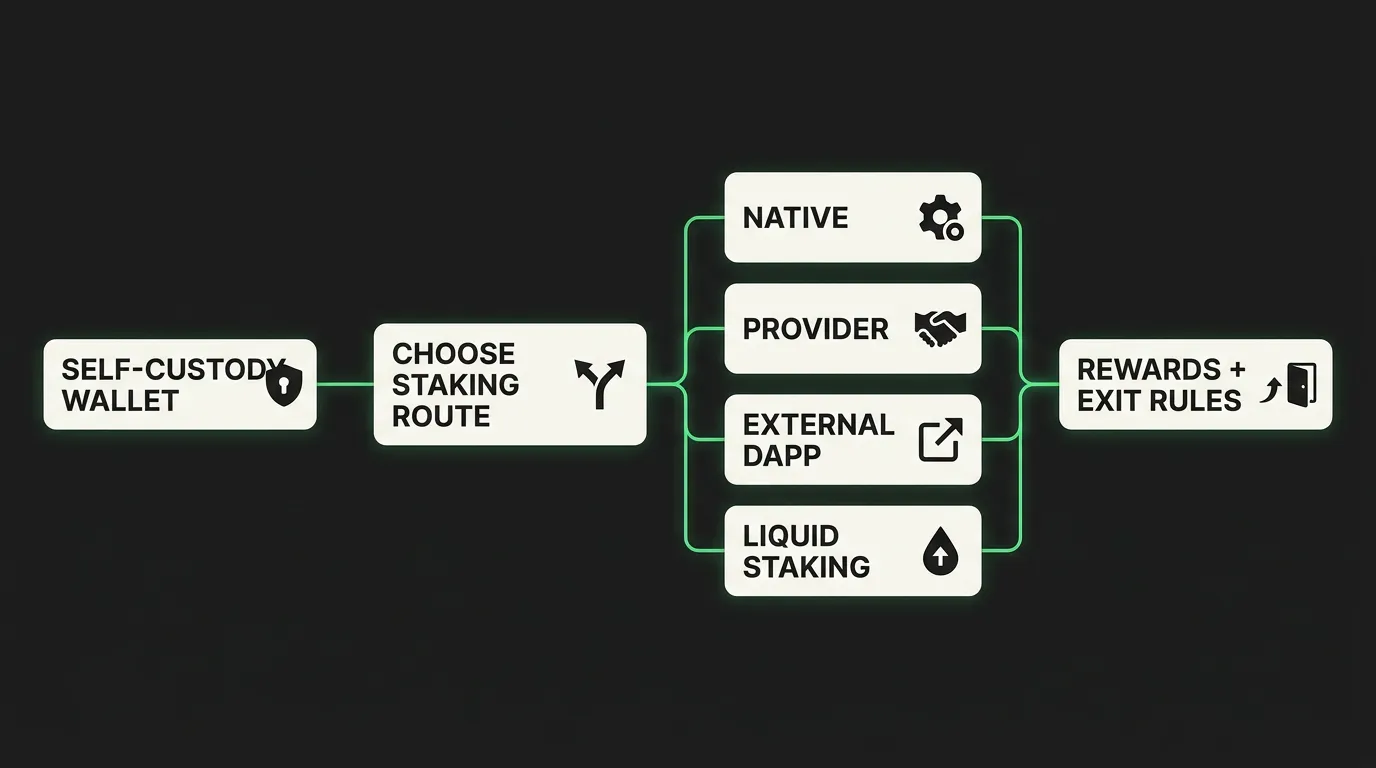
A wallet can provide several staking routes. The underlying network or provider still determines rewards, lock-up rules and exit mechanics.
Native staking gives the clearest relationship with the network, although validator and unbonding rules still matter. Integrated providers reduce setup work but add a service layer. External DApps require users to verify the destination and approvals. Liquid staking may keep a position usable in DeFi, but adds token-specific risks.
Self-custody does not mean every part of the process is trustless. It means the user controls the signing keys. A validator, staking provider, smart contract or liquid staking protocol can still affect the outcome.
1. FoxWallet: Selected Multi-Chain Staking on Mobile
Best for: FoxWallet users who want supported staking workflows alongside multi-chain asset management in one mobile wallet.
FoxWallet is non-custodial: users control their keys and approve staking transactions themselves. Current product documentation confirms mobile staking workflows for ALEO, ETH, QTUM, TRX and TX. The implementation differs by asset rather than using one universal staking engine.
ALEO staking is integrated through Beta Staking. ETH staking uses HashKey. QTUM and TRX have in-app staking flows, while TX staking is integrated with TX Chain. Filecoin is different: FoxWallet directs users to GLIF, so FIL staking should be treated as an external protocol route rather than native FoxWallet staking.
This makes FoxWallet useful for people already managing supported networks in its mobile app. A supported-chains list should not be read as a staking list: only confirmed assets should be treated as available.
What to watch: FoxWallet’s browser extension does not support staking. Mobile staking functions must not be projected onto the extension, and provider or network conditions can change. Users should check the current in-app flow before committing assets and leave enough of the network’s fee token for later transactions.
FoxWallet’s wallet security features guide provides practical context on recovery phrases, phishing and transaction review. Those controls help with signing discipline, but they do not remove protocol, validator or market risk.
2. Ledger: Hardware-Secured Staking Across Several Networks
Best for: Users who want staking transactions confirmed on a hardware device and are comfortable reviewing asset-specific providers.
Ledger’s staking documentation lists Ledger Live options for assets including ETH, SOL, ATOM and DOT. Depending on the asset, users may delegate to a validator or use an integrated provider such as Lido, Kiln or a Ledger by Figment validator. The Ledger device keeps the private keys off the everyday computer or phone and requires physical confirmation of transactions.
Ledger’s advantage is the separation between the signing key and the internet-connected interface. This is particularly relevant for long-term holders who do not want a software wallet alone to authorize staking actions. Ledger Live also gives users a central place to view supported staking positions.
What to watch: Hardware protection secures the keys and confirmation process; it does not make the staking protocol risk-free. Users still need to understand provider fees, validator performance, smart contracts, reward claiming and unstaking. Support also varies by provider and jurisdiction.
FoxWallet’s guide to hardware wallets versus app-only storage explains where hardware isolation helps and where it adds friction.
3. Trust Wallet: Broad Native-Staking Coverage
Best for: Users who want a self-custody wallet with a broad staking menu across mobile and a browser extension.
Trust Wallet’s official staking page lists more than 25 in-wallet options, including ETH, BNB, SOL, TRX, DOT, ATOM, INJ, SUI, ADA, CRO, KAVA and XTZ. Availability and validator choices can still differ by asset and interface.
The main appeal is breadth. Users can open the Earn area, choose a supported asset and follow the relevant network flow without searching for a separate staking site. Trust Wallet remains non-custodial, so the user authorizes each action with their own wallet.
What to watch: A single interface can hide meaningful differences between networks. Some assets use delegation, some use pools, and each can have its own minimum balance, validator options, reward-claim process and unbonding period. The official availability list and the wallet interface should be checked again immediately before staking.
Trust Wallet suits users prioritizing breadth; a network-focused wallet may offer deeper validator tooling.
4. MetaMask: Multiple Ethereum Staking Routes
Best for: Ethereum users who want to compare pooled, liquid and full-validator staking from a familiar self-custody wallet.
MetaMask’s staking tools focus on ETH. Its current documentation describes three distinct routes: pooled staking for users who do not want to supply 32 ETH, liquid staking through integrated protocols, and validator staking in multiples of 32 ETH through MetaMask Portfolio. MetaMask’s validator staking guide states that Consensys Staking operates the validator infrastructure while the user retains control of the account.
Pooled staking is accessible through MetaMask Portfolio and supported mobile flows. Liquid staking routes can issue tokens such as stETH or rETH that represent the position and may be used elsewhere. Validator staking creates a materially different commitment because each validator requires 32 ETH and uses a managed infrastructure service.
What to watch: These routes are not interchangeable. Pooled and liquid staking involve smart contracts and providers; a liquid staking token adds price and liquidity risk; validator staking has activation and exit queues as well as service fees. Users should select a route based on control and liquidity needs rather than the displayed reward estimate.
MetaMask is not the broadest multi-network option, but offers clear choices for ETH staking.
5. Phantom: Native and Liquid Solana Staking
Best for: Solana users choosing between direct validator delegation and a liquid staking token.
Phantom provides two well-defined SOL staking routes. With native staking, SOL is delegated to a selected Solana validator and remains in a stake account under the user’s control. With liquid staking, users receive Phantom Staked SOL (PSOL), a liquid staking token whose value reflects the underlying staked position.
The difference matters. Native staking pays rewards into the stake account, requires deactivation before withdrawal and lets the user choose a validator. Liquid staking keeps a transferable token that may be used in DeFi, but it adds pool, liquidity and token-specific risk. Phantom’s native-versus-liquid staking guide explains these mechanics side by side.
What to watch: Creating a new native stake account is currently supported in the Phantom browser extension, not the mobile app. Mobile users can view, unstake and withdraw existing native stakes. Liquid staking is available through both supported interfaces. This platform split is easy to miss if a comparison simply says “Phantom supports SOL staking.”
Phantom is a Solana-focused option for users comparing native and liquid staking. It is less suitable for users who want one wallet to manage staking across many unrelated networks.
6. Exodus: Guided Staking for Supported Assets
Best for: Beginners who want a guided staking interface and clear asset-by-asset instructions.
Exodus has built-in staking support for a current group of assets that includes ETH, APT, ADA, ATOM, INJ, KAVA, SOL and XTZ. Its official staking overview also shows that support varies by platform: an asset may be available on mobile, desktop or the Web3 wallet without being available everywhere.
The user remains in control of the wallet keys, while staking can rely on network delegation, smart contracts or third-party infrastructure. Exodus identifies Everstake as a provider for several staking services. The interface presents staking, unstaking and reward management in one place, which reduces the need to navigate external sites.
What to watch: “Built in” does not mean provider-free. Users should read the asset-specific guide because minimums, waiting periods, locked status and claim steps differ. Availability may also be limited by address or jurisdiction. Reward estimates in the wallet are informational and variable.
Exodus is a sensible choice for users who value consistency and guidance, but advanced users may want greater validator choice or a wallet designed around one ecosystem.
7. Trezor: Hardware Confirmation With Asset-Specific Staking
Best for: Existing Trezor users who want to stake supported assets without moving their signing keys into a software-only wallet.
Trezor Suite supports staking for selected assets, with current first-party guides covering ETH and SOL. ETH staking uses an Everstake pool, so the user can participate without running a 32 ETH validator. Trezor’s ETH staking documentation is unusually explicit that staked ETH and rewards sit in the provider pool and are no longer protected directly by the hardware device in the same way as an unstaked wallet balance.
SOL staking works differently. A Trezor-compatible stake account delegates voting weight to a validator while withdrawal authority remains tied to the user’s Trezor-controlled address. Current support depends on the Trezor model, so users should confirm device compatibility before beginning.
What to watch: The security boundary changes by staking method. Trezor confirms transactions and protects keys, but provider, pool and smart-contract exposure still matter. ETH entry and exit timing depend on network and pool conditions; SOL follows Solana epoch mechanics and requires an unstake-and-withdraw sequence.
Trezor makes the most sense for people already using its hardware and Suite. Buying a hardware wallet solely for staking may be unnecessary if the intended asset, provider and balance do not justify the extra operational step.
How to Choose the Right Staking Wallet
Start with the asset, not the brand. Confirm the native network and find the official staking documentation for that exact asset. Then work through this decision sequence:
- Choose custody. Decide whether you want self-custody or are willing to let an exchange or platform control the assets.
- Choose the staking method. Compare native delegation, a managed pool, liquid staking and an external DApp.
- Check liquidity. Find out whether the asset remains transferable, becomes locked, is represented by another token or enters an unbonding queue.
- Identify every party. Note the wallet, validator, staking provider, smart contract and liquid staking protocol involved.
- Review costs. Look for validator commission, provider fees, gas, network fees and claim or exit transactions.
- Confirm platform support. Mobile and browser-extension capabilities often differ. Do not assume one interface can perform every action available in another.
- Test the full exit path. Understand how to unstake, when funds become available and whether a manual claim is required.
For a broader view of wallet selection beyond staking, see FoxWallet’s comparison of the best crypto wallets. If your staking route uses external protocols or liquid staking tokens, the guide to wallets for DeFi covers DApp access and transaction-approval considerations.
Staking Risks to Review Before You Sign
Staking rewards are variable and do not make the underlying asset stable. A token can lose value while the staking balance grows. The risk profile also changes with the method used.
- Validator risk: Poor performance can reduce rewards. Some networks can penalize or slash validators for defined failures or malicious behavior.
- Unbonding and exit risk: Assets may be unavailable during an unbonding period, validator exit queue or provider processing window.
- Smart-contract risk: Pooled and liquid staking can depend on contracts that may contain bugs or be exploited.
- Liquid staking token risk: An LST can trade away from its expected value or lose liquidity, even when the underlying stake still exists.
- Provider risk: Integrated services introduce operational, contractual and jurisdictional dependencies.
- Approval and phishing risk: A fake staking page or malicious approval can compromise a self-custody wallet. Verify domains and read every signature request.
- Protocol-change risk: Networks can change reward formulas, validator rules, minimums and withdrawal mechanics.
- Market risk: Rewards do not offset every price decline, and unstaking delays may prevent an immediate sale.
Self-custody removes exchange custody from the equation, but it transfers more responsibility to the user. Keep the recovery phrase offline, use official links, maintain enough gas for exit transactions and begin with a small amount when testing a new workflow.
Crypto Staking Wallet FAQs
What is the best crypto wallet for staking?
There is no single best wallet for every asset. FoxWallet is useful for selected multi-chain mobile staking workflows; Ledger and Trezor suit users who want hardware confirmation; Trust Wallet and Exodus offer broad in-wallet access; MetaMask provides several ETH staking routes; and Phantom is a strong Solana-specific choice. Match the wallet to the asset, staking method, custody preference and exit rules.
Can I stake crypto directly from a wallet?
Yes, when the wallet supports staking for that exact asset. The flow may be native delegation, an integrated provider, a pool or a liquid staking protocol. Holding an asset in a wallet does not by itself mean the asset can be staked there.
Is staking from a self-custody wallet safe?
Self-custody lets you control the keys, but it does not eliminate validator, smart-contract, provider, phishing, market or unbonding risk. Safety depends on the staking route, the network and how carefully transactions are reviewed.
Which wallets support Ethereum staking?
Current options include FoxWallet mobile through an integrated provider, MetaMask through pooled, liquid or validator staking, Ledger Live through supported providers, Exodus Mobile, and Trezor Suite through an Everstake pool. The mechanics and minimums differ, so consult each wallet’s current ETH staking documentation before depositing.
What is the difference between native staking and liquid staking?
Native staking usually delegates the original asset according to the network’s rules. Liquid staking supplies a token representing the staked position, allowing it to remain transferable or usable in DeFi. That flexibility adds smart-contract, liquidity and token-specific risk.
Can I unstake crypto whenever I want?
You may be able to request unstaking at any time, but the assets may not become available immediately. Networks and providers can require unbonding periods, validator exit queues, epoch changes or a separate claim transaction.
Does FoxWallet support staking?
Yes. Current FoxWallet mobile staking support is confirmed for selected assets including ALEO, ETH, QTUM, TRX and TX. Filecoin uses an external route to GLIF rather than native FoxWallet staking. Availability and conditions are asset-specific.
Does the FoxWallet browser extension support staking?
No. FoxWallet’s confirmed staking workflows are mobile capabilities. The browser extension should not be treated as having feature parity with the mobile app for staking.
Download FoxWallet to review the currently available mobile staking options for supported assets.
This article is for informational purposes and is not financial, investment, legal or tax advice. Staking rewards are variable and not guaranteed. Verify current asset support, provider terms, fees and exit conditions before staking.