


How to Recover a Crypto Wallet Without a Seed Phrase — What’s Actually Possible in 2026

A crypto wallet can sometimes be recovered without the written seed phrase, but only when another valid recovery credential, encrypted backup, or signing device still exists. For a non-custodial wallet, there is no central reset button: if the seed phrase, private key, keystore file, active device, encrypted backup, and hardware wallet access are all gone, crypto wallet recovery is generally not possible.
That reality matters because searches for seed phrase recovery often attract fake support agents, phishing pages, and "guaranteed recovery" offers. Legitimate seed phrase support never requires you to share your seed phrase, private key, wallet password, screen, or device access.
FoxWallet is built around the same self-custody principle: users control their own private keys and assets, while FoxWallet does not access or hold user funds. That gives users strong ownership, but it also means FoxWallet cannot recover seed phrase data, reset private keys, or restore funds if every valid backup is lost.
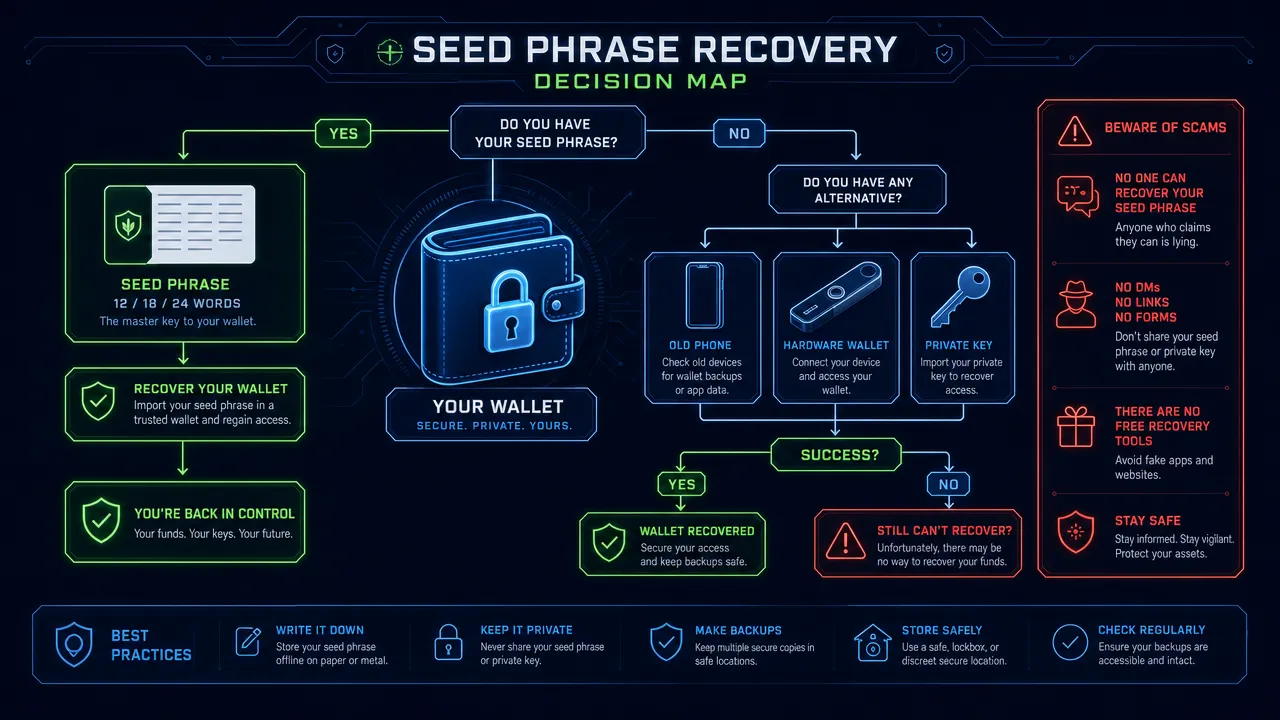
Seed phrase recovery is only possible when another valid wallet backup still exists
Seed phrase recovery is not magic. It is a process of regaining wallet access from a valid secret or backup that can still prove control of the wallet.
A seed phrase, also called a mnemonic phrase or secret recovery phrase, is usually the master backup for a non-custodial wallet. The BIP39 standard describes how many wallets turn random entropy into 12 to 24 human-readable words that can derive wallet keys. Ledger's explainer on BIP39 seed phrases also describes the phrase as a central recovery mechanism for self-custody wallets.
The key distinction is this: losing the written seed phrase is different from losing every recovery method.
| What you still have | Recovery likelihood | What it means |
|---|---|---|
| Full seed phrase | High | Restore the wallet in a trusted, official wallet app. |
| Private key | High | Import the private key carefully, then consider moving funds to a new wallet if exposure is possible. |
| Keystore file plus password | High | Decrypt the file locally using trusted software that supports the format. |
| Old phone or computer with wallet still unlocked | Medium to high | Use official wallet settings to back up or export credentials if supported. |
| Browser extension still unlocked | Medium to high | Reveal or export backup data only through the genuine extension interface. |
| Working hardware wallet with known PIN | Conditional | Move funds to a new wallet before the device fails, resets, or is lost. |
| Encrypted device or cloud backup plus required password | Conditional | Restore only on a trusted device from official software. |
| Partial seed phrase | Low and risky | Only limited owner-controlled recovery may be possible, with no guarantee. |
| Public address only | None | A public address cannot regenerate a private key. |
| Transaction history only | None | Transaction records do not provide signing authority. |
For a self-custody wallet, support teams can explain the app, warn about scams, and guide safe backup practices. They cannot create a new seed phrase for an existing wallet, reverse-engineer a private key, or move assets on behalf of the user.
For more context on why this model differs from exchange-style account recovery, see FoxWallet's guide to custodial vs non-custodial wallets.
Seed phrase recovery options for crypto wallet recovery without the phrase
Crypto wallet recovery without a seed phrase depends on what else remains. The safest approach is to identify the recovery path before clicking links, downloading tools, or asking strangers for lost seed phrase help.
If you have a private key
Private key recovery is possible only if you already have the correct private key. A private key controls a specific wallet address or account. Anyone with that key can sign transactions, so treat it as highly sensitive.
Use only an official wallet source, avoid copy-pasting the key into websites, and consider moving assets to a fresh wallet if the key may have been stored in cloud notes, screenshots, chat logs, or another exposed location.
Seed phrase recovery and private key recovery are related, but they are not identical. A seed phrase can derive many keys and addresses. A private key usually controls one account or address.
If you have a keystore file and password
Wallet backup recovery may be possible with a keystore file, often called a UTC or JSON file in Ethereum contexts. The EIP-2335 keystore standard describes encrypted keystore formats, and Go-Ethereum keystore documentation explains how keystore files are protected by passwords.
The file alone is not enough. The password is required to decrypt it. If either the keystore file or password is missing, recovery may fail.
Never upload a keystore file to an unknown "recovery" page. A phishing site can steal the file and attempt to capture the password.
If your old phone or computer still works
An original device can be the best source of lost seed phrase help if the wallet is still installed and unlocked, or if you still know the local wallet password.
On a trusted device, open only the official wallet app or extension. Check whether the wallet allows you to reveal, export, or back up the mnemonic phrase or private key through its own settings. Do not use screen sharing. Do not accept support through unsolicited DMs. Do not let anyone watch while you access wallet settings.
If the original backup is lost, a safer path is often to create a new wallet, write the new mnemonic phrase offline, test it, and move funds from the old wallet to the new one.
If your browser extension is still unlocked
A genuine browser extension may allow backup export if the extension is still accessible and the local password is known. This is a narrow but important seed phrase recovery path.
Risks include fake extensions, compromised browser profiles, clipboard malware, and malicious "wallet verification" pages. Start from the official domain, avoid search ads, and never install an extension from a random link.
FoxWallet supports both mobile and browser extension workflows, so users can manage assets across devices. However, the same non-custodial rule applies: FoxWallet stores mnemonic phrases and private keys locally in encrypted form, and FoxWallet cannot retrieve them from its servers.
If a hardware wallet still works
If the hardware wallet still works, the PIN is known, and the device can sign transactions, recovery may be practical even if the written seed phrase is gone.
Do not reset the device. Do not update firmware in panic before understanding the risk. First, create a new wallet with a properly backed-up seed phrase. Then move assets from the old wallet to the new one while the hardware device can still sign transactions.
If the device is lost, damaged, wiped, or PIN-locked, and the recovery phrase is gone, wallet recovery may be impossible.
If you have an encrypted backup
Some users may have encrypted device backups, local vault data, or cloud backups that include wallet data. Recovery depends on whether the backup actually contains the wallet data and whether the required device password, account password, or wallet password is still known.
Encrypted backups are not a replacement for a seed phrase. They are conditional recovery paths, not guaranteed ones.
If you only have an address or transaction history
A public wallet address is safe to share for receiving funds and checking balances, but it cannot regenerate the private key. Transaction history can help with accounting, tax records, or fraud reports, but it cannot authorize transactions.
Anyone claiming they can recover a wallet from only a public address, screenshot, or transaction hash is making a suspicious claim.
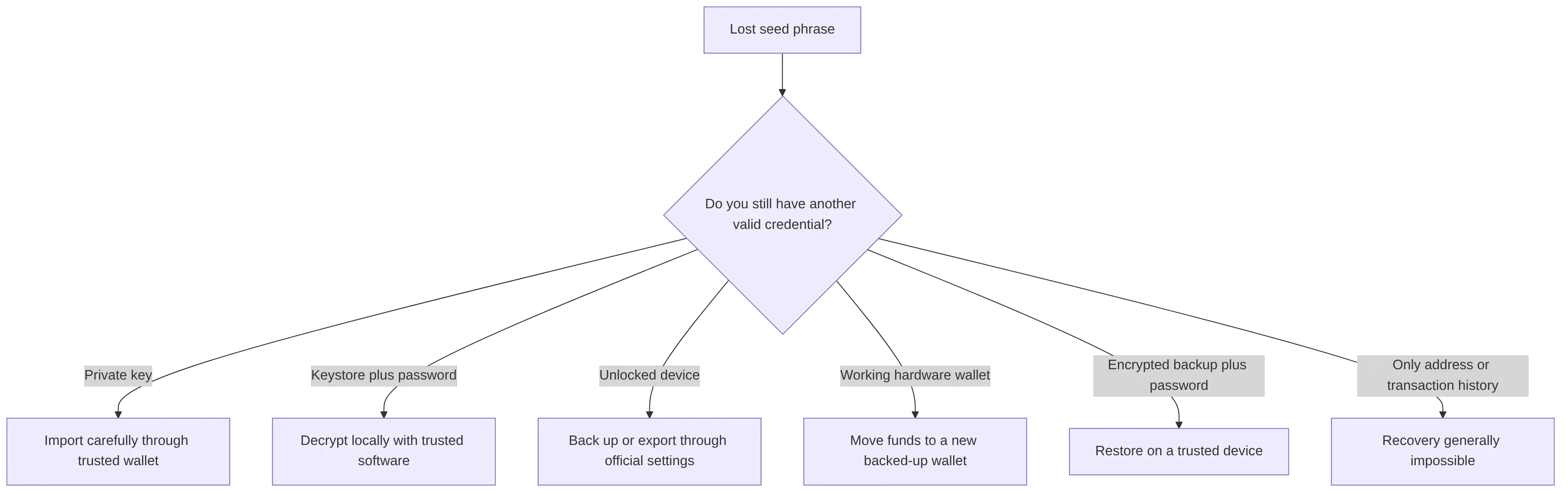
Seed phrase recovery limits in non-custodial wallets
Non-custodial wallets are designed so the user controls the keys. That design improves direct ownership, but it also removes traditional account recovery.
FoxWallet is a non-custodial, multi-chain decentralized wallet. Users retain control of their private keys and assets. FoxWallet does not custody funds, does not access private keys, and does not store a user-recoverable copy of a seed phrase on a central server.
That means FoxWallet can support secure self-custody practices, but it cannot provide custodial-style recovery.
| Request | What wallet support can do | What wallet support cannot do |
|---|---|---|
| "I lost my seed phrase." | Explain safe next steps and backup concepts. | Recover seed phrase words from a server. |
| "I still have my old phone." | Guide users to official app settings and safety checks. | Access the user's phone or extract secrets remotely. |
| "I have a public address." | Explain how to view balances and history. | Derive a private key from the address. |
| "I sent funds to the wrong address." | Explain transaction status and general safety steps. | Reverse a confirmed blockchain transaction. |
| "Someone asked for my seed phrase." | Warn that this is unsafe and likely malicious. | Validate a third-party recovery agent. |
This limitation is not a weakness of FoxWallet. It is the defining feature of self-custody. The wallet helps users sign transactions and manage assets, but the blockchain does not give wallet providers special authority over user funds.
For users evaluating self-custody security, FoxWallet's article on a secure non-custodial wallet explains why offline backup discipline is essential. FoxWallet's guide to wallet security features in 2026 also covers local encryption, sandbox isolation, risk alerts, and phishing protection.
Seed phrase recovery scams to avoid when seeking lost seed phrase help
Seed phrase recovery searches are high-risk because users are often stressed and willing to try anything. Scammers exploit that urgency.
The California DFPI Crypto Scam Tracker documents recurring crypto scam patterns, including fake platforms and recovery-related fraud. Group-IB's overview of cryptocurrency scams describes phishing, wallet drainers, and impersonation risks. AMLBot's crypto scam prevention checklist also warns users to treat recovery offers with caution.
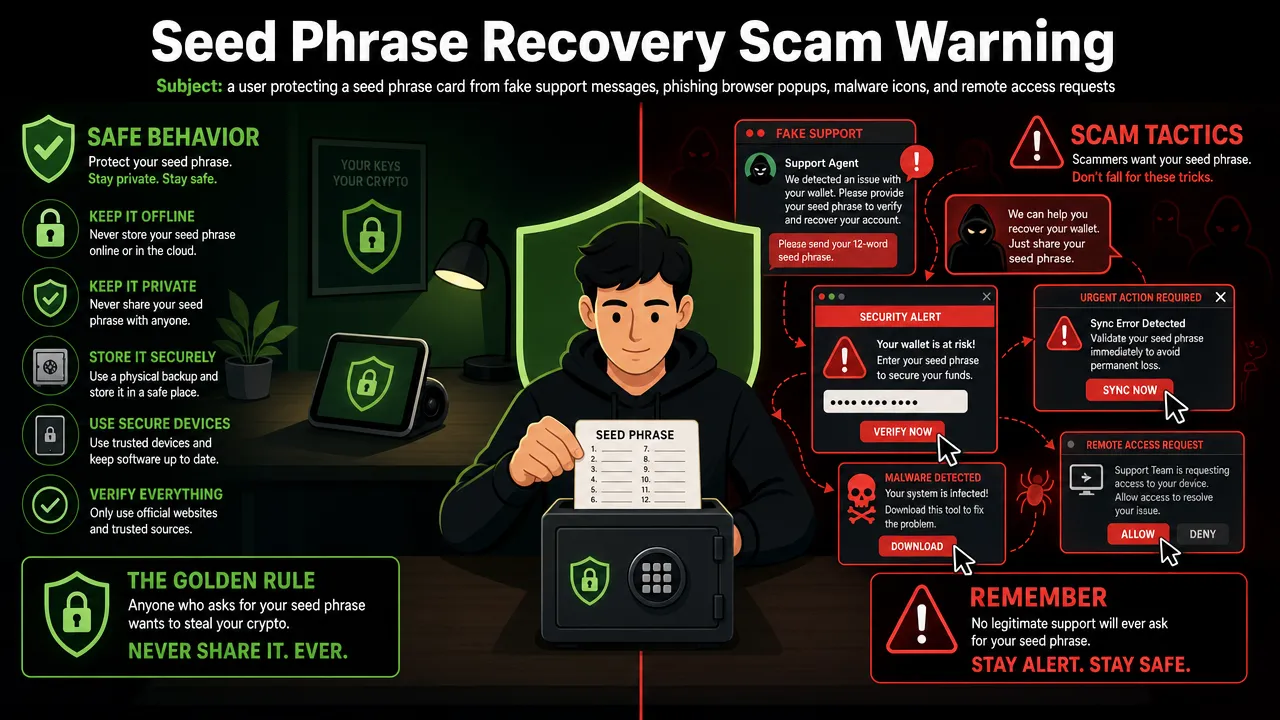
Common red flags
| Scam pattern | What it looks like | Safe response |
|---|---|---|
| Fake support DMs | Someone on Telegram, Discord, X, or email claims to be wallet support. | Ignore and report. Start only from the official website. |
| Guaranteed recovery claims | A service says it can recover any wallet. | Treat as suspicious, especially if you only have an address. |
| Upfront crypto payment | A recovery agent asks for fees before any verifiable result. | Do not pay. |
| Seed phrase request | A form asks for 12 or 24 words. | Close the page immediately. |
| Private key request | A "technician" asks you to paste or upload a key. | Refuse. A private key gives full control. |
| Screen sharing | Someone asks to watch wallet settings or guide you remotely. | Never reveal wallet screens or credentials. |
| Fake extensions | A download mimics a trusted wallet or recovery tool. | Install only from official channels. |
| Clipboard malware | Copied addresses are replaced silently. | Verify addresses character by character before sending. |
Never share:
- Seed phrase.
- Mnemonic phrase.
- Private key.
- Keystore password.
- Wallet password.
- 2FA codes.
- Device passcode.
- Cloud backup credentials.
- Screen recordings.
- Remote desktop access.
- Signatures you do not understand.
A legitimate support agent will never ask for your seed phrase or private key. A legitimate wallet does not need those secrets to answer support questions.
Seed phrase recovery prevention with FoxWallet self-custody
Prevention is the only reliable form of seed phrase recovery. A strong backup routine protects users before a device fails, an app is deleted, a browser profile is corrupted, or a hardware wallet is lost.
FoxWallet is built as a security-first, non-custodial, multi-chain wallet for users who want full asset control without giving up practical Web3 usability. It supports locally encrypted storage of mnemonic phrases and private keys, multi-chain asset visibility, automatic asset and NFT detection on supported networks, mobile access, browser extension workflows, DApp access, risk-aware transaction prompts, and phishing protection strategies.
FoxWallet also supports cross-chain swap functionality through in-wallet routing and aggregation, helping users exchange assets across major blockchains with clearer transaction context. This is separate from backup and recovery. Cross-chain convenience does not replace seed phrase responsibility.
A safer backup workflow
- Install the wallet only from the official source.
- Create the wallet in a private environment.
- Write the seed phrase offline.
- Number every word in order.
- Store the phrase in a secure physical location.
- Keep a second backup in a separate secure place.
- Avoid screenshots, cloud notes, email drafts, and chat apps.
- Test the wallet with a small amount before storing significant assets.
- Review wallet approvals periodically.
- Update devices and wallet apps from official sources only.

Practical FoxWallet safety habits
| User type | Risk | FoxWallet habit that helps |
|---|---|---|
| Beginner | Confusing password with seed phrase | Treat the wallet password as a local unlock method and the seed phrase as the master backup. |
| Multi-chain user | Losing track of assets across networks | Use FoxWallet's unified asset view to monitor token balances and NFTs across supported chains. |
| DApp user | Signing malicious approvals | Read FoxWallet risk prompts carefully before confirming transactions. |
| Browser extension user | Installing fake extensions | Start from the official FoxWallet website and avoid search-ad downloads. |
| Mobile user | Device loss or damage | Keep an offline backup before adding funds. |
| Frequent swap user | Hidden costs or rushed approvals | Review route details, fees, slippage, and contract context before signing. |
FoxWallet's guide to secure and fast multi-chain management provides more detail on how the wallet combines non-custodial security, multi-chain asset management, DApp access, and cross-chain swaps. For broader Web3 routines, FoxWallet's article on mastering Web3 assets explains how asset visibility, risk alerts, and multi-platform access fit into daily wallet use.
FAQs about seed phrase recovery
Can I recover seed phrase words after losing them?
You usually cannot recover seed phrase words themselves unless they still exist somewhere, such as an old device, official wallet backup view, encrypted backup, written copy, or another valid owner-controlled record. If the phrase is completely gone and no other recovery method exists, recovery is generally impossible.
Can FoxWallet recover my seed phrase?
No. FoxWallet is non-custodial and does not access or hold user private keys, seed phrases, or funds. FoxWallet can provide seed phrase support in the form of education, app guidance, and safety warnings, but it cannot retrieve or reset lost mnemonic phrases.
Is a wallet password the same as a seed phrase?
No. A wallet password usually unlocks the app or decrypts local wallet data on a specific device. A seed phrase restores the wallet across compatible environments. If you lose the wallet password but still have the seed phrase, recovery may be possible. If you lose both, recovery may fail.
Can I recover crypto with only my wallet address?
No. A wallet address can show balances and transaction history, but it cannot produce the private key. A public address is not a recovery credential.
What should I do if my old phone still has the wallet?
Disconnect from risky links, use only the official wallet app, check whether the wallet is still unlocked, and back up or export credentials only through official settings if supported. If the old backup is gone, create a new wallet with a properly stored seed phrase and move funds carefully.
Are seed phrase recovery services legitimate?
Some professional data recovery or security specialists may help in narrow, lawful, owner-controlled cases, such as damaged devices or partial backup analysis. Any service promising guaranteed recovery from only an address, screenshot, or transaction hash is suspicious. Never share your seed phrase or private key.
How should I store a mnemonic phrase safely?
Write it offline, number the words, keep it away from cameras and cloud storage, and store copies in separate secure physical locations. Do not save it in screenshots, email, chat apps, or unencrypted files.
Start self-custody safely by using FoxWallet only from the official website, backing up your mnemonic phrase offline before adding funds, and testing with a small transaction before larger multi-chain activity.