


Best USDT Wallets in 2026: ERC-20, TRC-20 & Multi-Chain Options

The best USDT wallets in 2026 are the ones that support your exact network, work on your preferred device, and give you a recovery method you understand. A wallet that suits Ethereum DeFi may not suit TRON transfers, while a hardware setup serves a different purpose from an everyday mobile app.
For mobile users managing Ethereum and TRON assets, FoxWallet belongs on the shortlist. Other options serve specific needs, including browser-based transactions, Solana access, and hardware signing.
This guide compares nine USDT wallet options by use case rather than declaring one universally best. It also explains network compatibility, transaction costs, and the responsibilities that come with self-custody.
Best USDT wallets at a glance
A stablecoin wallet manages the keys and transaction permissions used to access blockchain balances. Your USDT is recorded on its network, not stored inside the app as a downloadable file.
The first decision is therefore not which app looks best. It is which network your recipient, exchange, or DApp requires.
| Wallet | Best-fit use case | Relevant USDT coverage | Important qualification |
|---|---|---|---|
| FoxWallet | Mobile multi-chain asset management | Ethereum and TRON mobile workflows | Its current guide excludes TRON from the extension |
| MetaMask | Ethereum use with native TRON access | Ethereum and TRON | Native TRON support arrived in January 2026 |
| Trust Wallet | Mobile and extension flexibility | Ethereum and TRON | Check current version and account-specific recovery |
| OKX Wallet | Broad Web3 asset management | Ethereum and TRON documentation | Keep the wallet separate from exchange services |
| TokenPocket | TRON-oriented mobile and browser use | TRON and Ethereum | TRON is available on mobile and the Chrome extension |
| Bitget Wallet | Integrated trading and gas-payment convenience | Ethereum and TRON documentation | Gasless trading does not mean every transfer is free |
| Rabby | Ethereum and EVM DApp interactions | Ethereum and EVM-compatible networks | Designed for EVM activity rather than native TRON |
| Phantom | Solana USDT alongside Ethereum access | Solana and Ethereum | TRON is not supported |
| Ledger | Hardware signing for reserve balances | Ethereum and TRON documentation | Check device, application, and connection compatibility |
These are use-case recommendations, not security scores. Blockchain support does not guarantee every token, swap route, or platform feature.
For US readers, distinguish basic self-custody functionality from third-party services. Buying crypto, selling to fiat, or using an integrated provider may involve identity verification, regional restrictions, or separate terms.
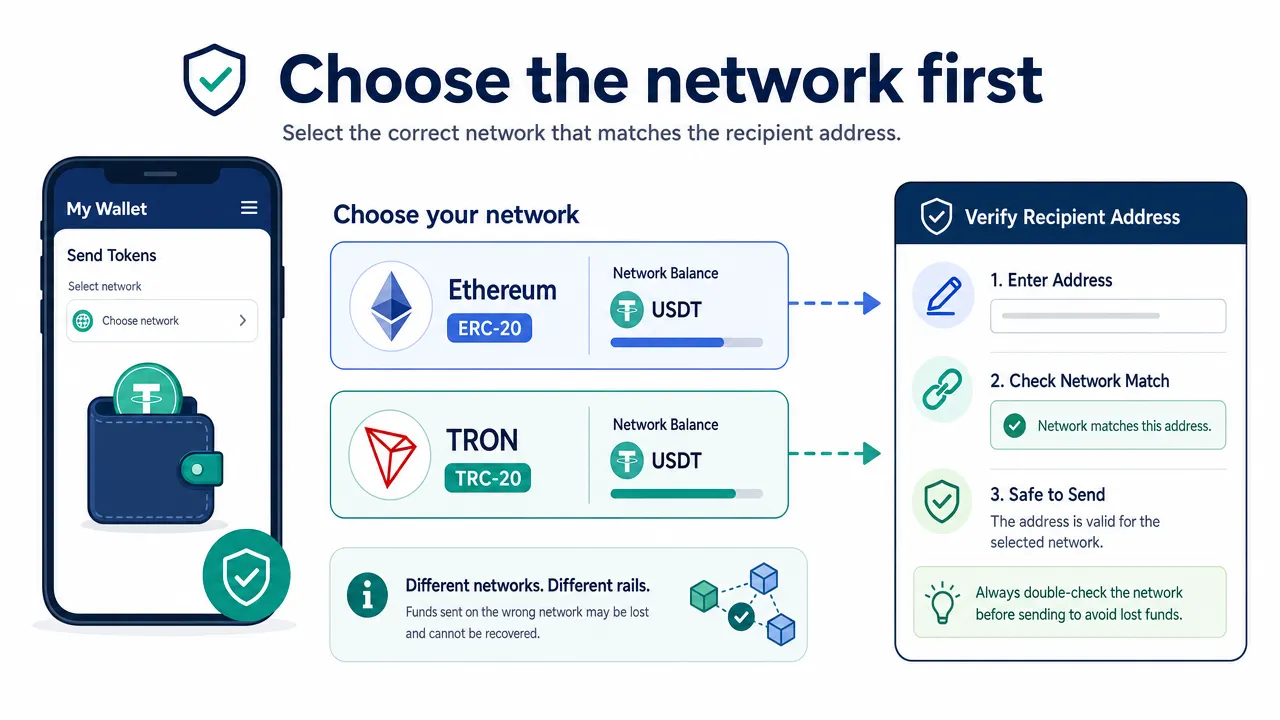
How to choose between ERC-20, TRC-20, and multi-chain wallets
For a deeper comparison of network fees, compatibility, gas requirements, and transfer considerations, see FoxWallet's ERC-20 vs TRC-20 USDT guide.
An ERC-20 USDT wallet needs Ethereum support
An ERC-20 USDT wallet must support the genuine USDT token on Ethereum and let you receive, sign, and send transactions using the relevant account.
Ordinary outgoing transactions require ETH for gas. Sending USDT is a token-contract interaction, so a simple ETH-transfer estimate is not necessarily a useful estimate for a USDT transfer.
Ethereum addresses commonly begin with 0x. However, other EVM networks use the same address format. A matching-looking address does not establish that a recipient accepts a deposit on that network.
A TRC-20 USDT wallet needs explicit TRON integration
A TRC-20 USDT wallet must support TRON accounts and token transactions. EVM compatibility alone is not enough, and adding an arbitrary custom RPC does not create TRON support.
TRON uses Bandwidth and Energy. When available resources are insufficient, TRX may be charged. Account activation also matters: generating an address locally and activating an account on-chain are different events.
Receiving USDT does not, by itself, prove that the account is ready for outgoing transfers. The TRON account documentation explains this distinction.
| Check | Ethereum USDT | TRON USDT |
|---|---|---|
| Token standard | ERC-20 | TRC-20 |
| Network | Ethereum | TRON |
| Ordinary fee mechanism | Gas paid in ETH | Bandwidth, Energy, and applicable TRX charges |
| Common address cue | Starts with 0x |
Commonly starts with T |
| Main operational check | Correct chain and sufficient ETH | Correct chain, activation, and sufficient resources |
A multi-chain USDT wallet keeps balances separate
A multi-chain USDT wallet can display supported assets from several networks in one interface. That convenience does not combine the balances into a single transferable pool.
If you own Ethereum USDT and need to pay a TRON recipient, switching the network selector does not move the funds. You need a supported cross-chain service or another compatible conversion route.
Check what the destination asset actually is. Issuer-issued USDT, bridged tokens, and other dollar-denominated assets can have different dependencies. Use Tether's supported-protocol directory to verify the network and token identifier rather than trusting a ticker or logo.
The following flow is a compatibility checklist, not a cost or speed comparison.
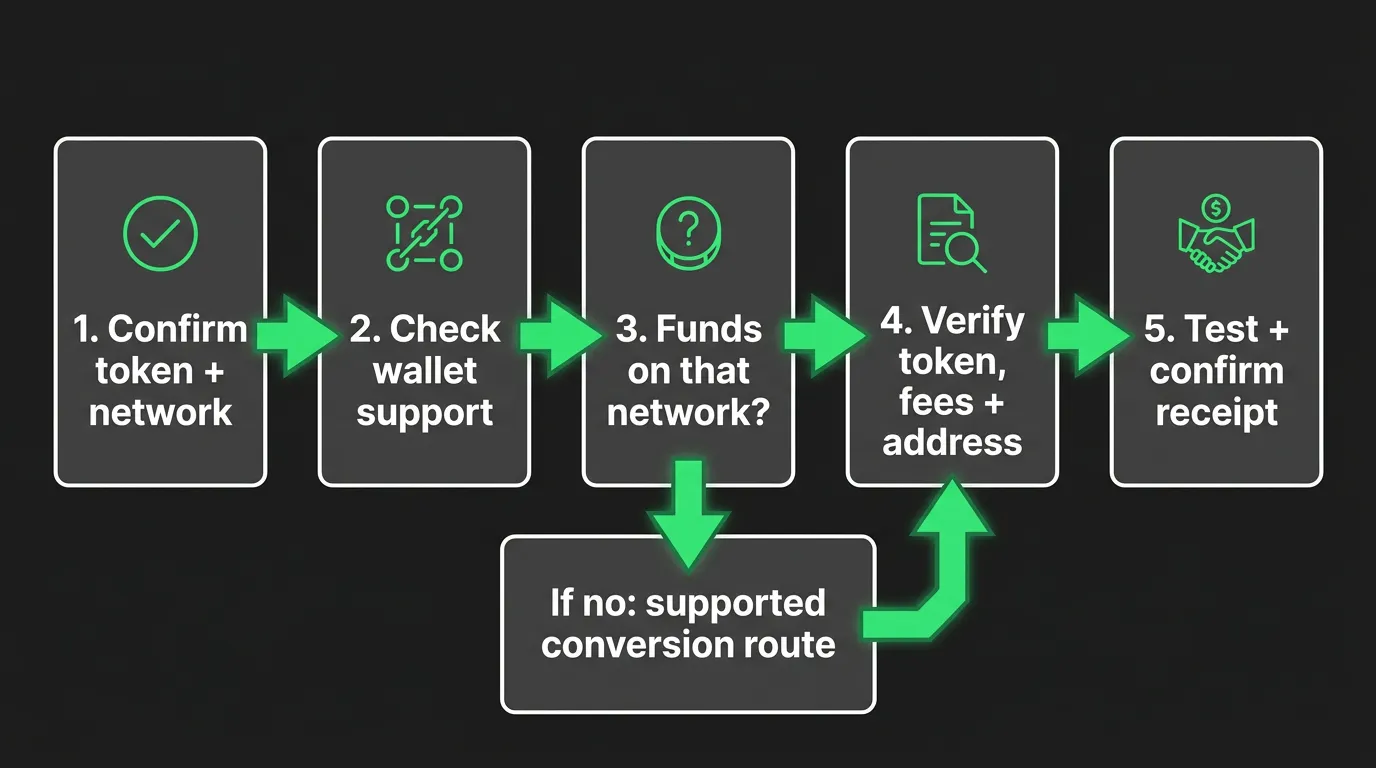
Nine best USDT wallets by use case
1. FoxWallet for mobile multi-chain management
FoxWallet is a non-custodial wallet designed for users who want to manage multiple blockchain assets without handing custody to a provider. Users control their private keys, and FoxWallet documents locally encrypted storage of keys and recovery material.
Its mobile product is relevant to both Ethereum/ERC-20 and TRON/TRC-20 workflows. Unified asset viewing, automatic asset discovery, and on-chain balance synchronization help reduce the need to move between separate interfaces.
For beginners, that means a common starting point for receiving assets and reviewing balances. Advanced users can access supported DeFi protocols through the DApp browser and use integrated trading tools.
FoxWallet mobile documentation identifies 1inch for Swap and LI.FI for Bridge on supported networks. These integrations simplify access to routing services, but they do not prove that a particular Ethereum-to-TRON USDT route is available. Our aggregator overview explains the integration context.
Platform limitation: FoxWallet offers iOS, Android, and browser-extension products, but network coverage differs. Its current TRC-20 guide says the extension does not support TRON, so this recommendation is specifically for FoxWallet mobile.
Best fit: Users seeking mobile self-custody, multi-chain asset management, and access to supported DApps and trading services.
2. MetaMask for Ethereum and native TRON access
MetaMask added native TRON support in January 2026 on both Mobile and Extension, including support for TRX and TRON-based tokens such as USDT. This is a native integration, not an EVM custom-network workaround.
That makes it relevant to users who already work with Ethereum and want documented TRON access in the same product family. Still, account selection, fee resources, and network-specific features require attention.
Recovery-phrase and hardware-wallet connection documentation are available, but hardware support should not be generalized across every network.
Best fit: Users comparing Ethereum workflows with native TRON support on mobile and extension.
Watch for: Product-specific swap fees, platform differences, and hardware compatibility for the exact transaction.
3. Trust Wallet for mobile and extension flexibility
Trust Wallet is another self-custody candidate for Ethereum and TRON users. Its documentation describes managing TRON USDT, and extension support for TRON is explicitly documented.
Its appeal is broad asset management across mobile and browser interfaces. As with every multi-chain product, that does not guarantee a particular bridge route or identical features on every device.
Security history deserves context. An official update and independent security reporting describe a December 2025 incident involving extension version 2.68. That should not be presented as proof that every mobile installation was directly affected or that current versions remain vulnerable.
Best fit: Users comparing mobile and extension access to Ethereum and TRON.
Watch for: Current security guidance and the recovery model for your actual account type.
4. OKX Wallet for a broad Web3 interface
OKX Wallet is a non-custodial Web3 product, distinct from an OKX exchange account. Its asset-management documentation explicitly uses USDT on TRON as an example, alongside broader Ethereum and multi-chain coverage.
The distinction between wallet and exchange matters. A guide involving exchange deposits and withdrawals is not proof of a decentralized bridge inside the wallet.
Recovery can also differ by account setup. Seed-phrase, private-key, and other backup workflows should not be treated as interchangeable.
Best fit: Users wanting asset management and Web3 tools within a broad interface.
Watch for: Instructions that mix exchange custody, withdrawal fees, and self-custody transactions.
5. TokenPocket for TRON-oriented mobile use
TokenPocket supports TRON wallet creation and import on both mobile and its Chrome extension. Its recovery material covers phrase, private-key, and keystore imports, with an emphasis on offline backups.
This makes it a relevant option for users comfortable managing network accounts and TRON resources.
Importing keys is a sensitive action. Only use an authentic application, and never enter recovery material into a website claiming to provide wallet support.
Best fit: Users evaluating TRON-focused mobile workflows and explicit backup options.
Watch for: Exact token support, current resource requirements, and platform-specific capabilities.
6. Bitget Wallet for integrated trading convenience
Bitget Wallet is separate from the Bitget exchange. Its documentation identifies Ethereum and TRON USDT support and describes integrated swap functionality.
Its TRON material also describes gasless trading. This is a feature-specific convenience, not evidence that every ordinary transfer needs no TRX or incurs no economic cost.
Before relying on such a feature, identify whether you are making a direct transfer, swapping on one network, or moving assets across networks. Different actions may have different eligibility and payment rules.
Best fit: Active users comparing integrated trading and alternative gas-payment workflows.
Watch for: Service charges, supported actions, and the final destination amount.
7. Rabby for Ethereum and EVM DApps
Rabby is designed for Ethereum and EVM-compatible networks, with portfolio, swap, cross-chain, and DApp tools for that ecosystem. It is therefore a fit for EVM-based USDT activity rather than native TRON transfers.
Best fit: Users whose USDT activity centers on EVM DApps.
Watch for: Network-specific token support and the signing workflow on your chosen platform.
8. Phantom for Solana USDT alongside Ethereum
Phantom documents Solana USDT and Ethereum support, making it relevant to users whose activity spans those ecosystems.
Mobile and extension products are available, with documented recovery guidance and hardware integration. However, account types and device compatibility still require checking.
Phantom supports Solana and Ethereum but does not support TRON. A multi-chain label should not be interpreted as support for every USDT network.
Likewise, built-in bridge access does not mean every route delivers USDT on the destination chain. Review supported output assets before confirming.
Best fit: Solana USDT holders who also want Ethereum access.
Watch for: Destination-token restrictions and unsupported assumptions about TRON.
9. Ledger for hardware signing and reserve balances
Ledger hardware wallets fill a different role from software-only wallets. Their purpose is to reduce exposure of signing keys to an ordinary connected computer or phone.
Ledger's USDT documentation explicitly covers Ethereum and TRON with compatible companion software. Check the exact device, operating system, connection method, and network before purchasing.
Generate fresh recovery material on the device and keep it offline. Do not enter a hardware wallet's recovery phrase into a software wallet simply to connect the two.
Hardware does not remove malicious-approval, bridge, issuer, or backup risks.
Best fit: Reserve balances and users prioritizing reduced online key exposure.
Watch for: Device costs, recovery planning, and careful transaction review.
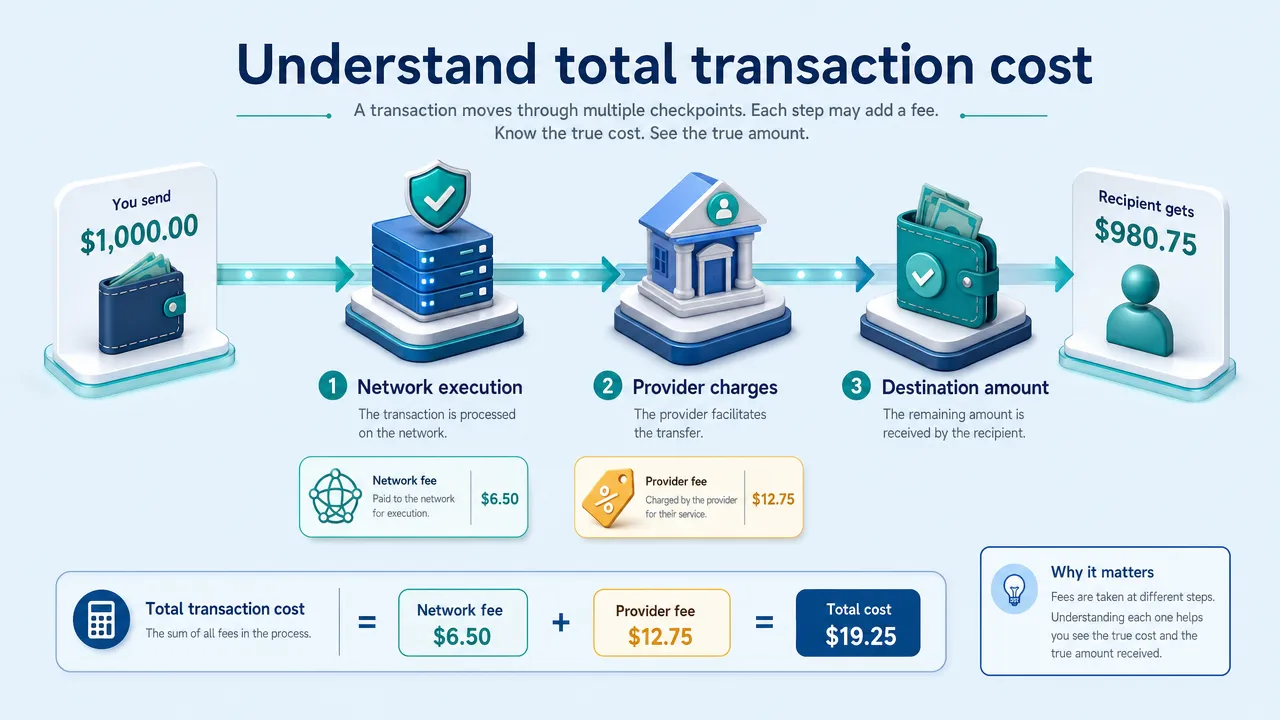
What the best USDT wallets actually cost to use
There is no universally cheapest USDT wallet because total cost depends on the network, transaction type, route, current conditions, and any provider fees.
Separate the action you are taking before comparing fees.
| Action | Costs to inspect |
|---|---|
| Direct Ethereum transfer | Token-transfer gas estimate and effective gas price |
| Direct TRON transfer | Available resources, applicable TRX charges, and activation requirements |
| Same-chain swap | Approval if needed, network execution, platform fees, and price impact |
| Cross-chain conversion | Source execution, provider charges, destination execution, and output token |
| Fiat purchase | Payment charges, spread, minimums, and regional conditions |
| Hardware setup | Device purchase plus ordinary transaction costs |
Compare the amount received, not just the headline fee
For a useful comparison, hold the amount, networks, token identifiers, and timing as constant as possible.
For example, compare a proposed 100 USDT transfer on the same network across compatible interfaces. For a cross-chain route, also record the provider, destination asset, quoted output, minimum received, and any separately paid gas.
A practical calculation is:
Economic route cost = input value - destination output value + separately paid costs.
Do not add a provider fee twice if it has already been deducted from the output.
Slippage tolerance is also not automatically a charged fee. It is a limit on acceptable execution movement.
Gasless does not mean costless
A service may sponsor execution, supply TRON resources, deduct charges from another balance, or include costs in a trading quote. The fee-payment experience changes, but the underlying work still has a cost.
FoxWallet's integrated routing can reduce transaction friction, but the lowest-cost route still depends on the current quote, network conditions, and destination output.
Our transfer-cost guide provides additional background, but use current transaction estimates rather than treating historical fee examples as fixed prices.
Cross-chain transfers should also be evaluated separately from any yield product. Moving USDT to another network does not itself generate a return.
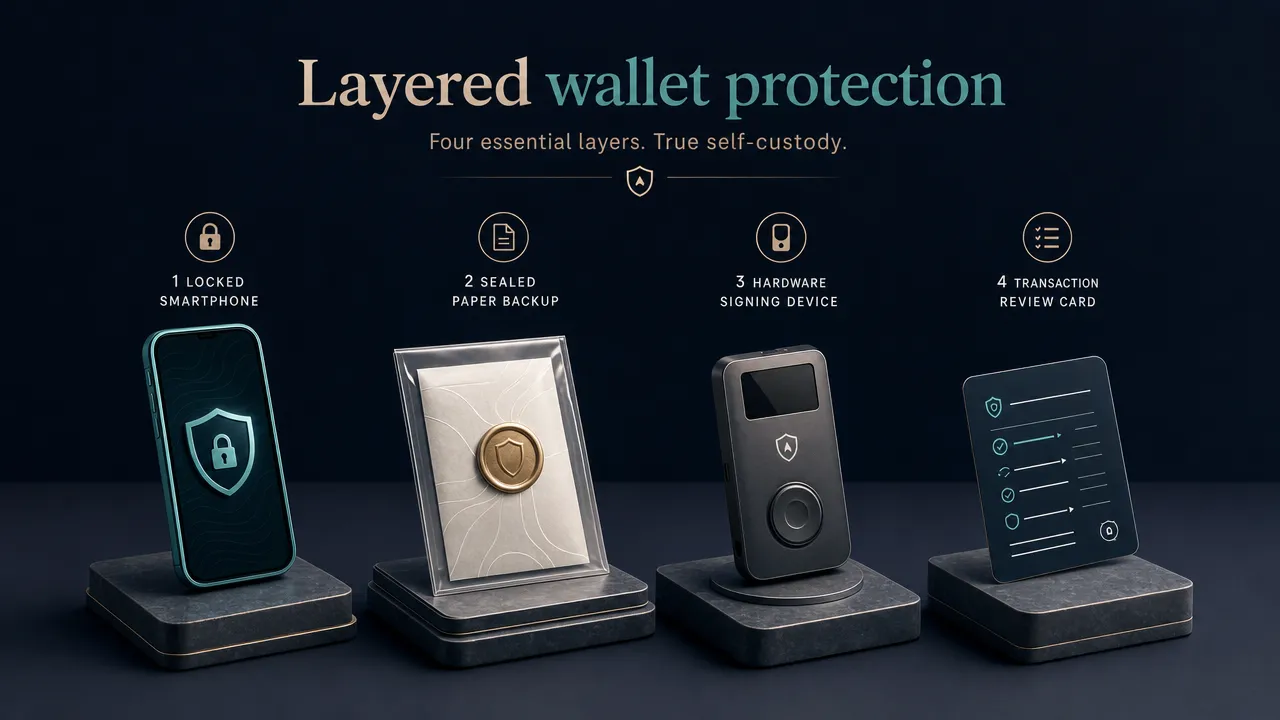
How to use a secure USDT wallet more safely
A secure USDT wallet is not simply a product with encryption, warnings, or a hardware connection. It is a combination of suitable software, protected recovery material, careful signing, and an understanding of token risks.
Protect recovery material before funding the wallet
Back up the recovery method for the account you actually created. A separately imported private key may require its own backup; do not assume one phrase restores every account visible in an interface.
Never share recovery phrases or private keys with support agents, bridges, fee services, or recovery websites. Store backups offline with appropriate physical protection.
FoxWallet documents local encrypted key storage and transaction-risk warnings. These controls support self-custody, but they cannot make every authorized action safe. Our backup and phishing precautions provide additional guidance.
Check the transfer, not just the address
Before sending:
- Confirm the asset, network, and recipient requirements.
- Verify the token identifier using authoritative documentation.
- Check ETH gas or TRON activation and resources.
- Review the full destination address and amount.
- Inspect permissions if a contract approval is involved.
- Send a small test where practical, respecting deposit minimums.
- Confirm both blockchain execution and destination crediting.
If something looks wrong, stop rather than sending more. Our transaction-tracking walkthrough explains how to investigate TRON transfers.
Keep DApp risk separate from reserve storage
A built-in DApp browser makes access more convenient; it does not certify every application. Lending protocols, liquidity pools, and other contracts introduce their own risks.
Consider separating everyday interaction funds from reserves. Review unused approvals, and remember that revocation cannot undo an already completed theft.
Understand what self-custody cannot change
Self-custody gives you control over signing keys, not control over the USDT issuer.
Tether's legal terms describe issuer powers and restrictions. A wallet cannot guarantee that USDT is immune to freezing, redemption limitations, or other token-level risks.
Similarly, an audit covers a defined scope at a particular time. It is not a guarantee for every future release or connected service.
FAQs about choosing the best USDT wallets
Can one wallet manage ERC-20 and TRC-20 USDT?
Yes, if it explicitly supports Ethereum and TRON on your chosen platform. The balances remain separate, and support for both networks does not guarantee a direct conversion route between them.
Does FoxWallet support TRC-20 USDT?
FoxWallet documents TRON USDT workflows on mobile. Its current guide explicitly says the browser extension does not support TRON. Use the mobile product for the TRON use case described here, and check current documentation before funding an account.
Does MetaMask support TRC-20 USDT in 2026?
Yes. MetaMask added native TRON support in January 2026 for Mobile and Extension, including TRX and TRON-based tokens such as USDT.
Do I need ETH or TRX to send USDT?
Ordinary Ethereum transactions require ETH for gas. TRON transactions require network resources, with TRX charges potentially applying when resources are insufficient. Sponsored or alternative-payment features are specific exceptions that must be verified.
Can a wrong-network transfer be recovered?
Sometimes, depending on key control, chain compatibility, and the receiving service's policies. Recovery is never guaranteed. Do not disclose your recovery phrase to anyone promising to reverse a transfer.
Which option should I choose?
Start with your main workflow:
- Mobile Ethereum and TRON management: Compare FoxWallet with other documented multi-chain candidates.
- TRON browser access: MetaMask, Trust Wallet, and TokenPocket support TRON in their current browser-extension products.
- EVM DApps: Evaluate Ethereum-focused options such as MetaMask and Rabby.
- Solana USDT: Phantom is a relevant candidate.
- Reserve storage: Consider compatible hardware signing.
For users who want self-custody, unified mobile asset management, and access to supported DeFi tools, FoxWallet is a practical place to start. Check your required network, protect your recovery material, and review the actual transaction quote before committing funds.