


Secure Multi-Chain BTC Wallet: FoxWallet

Commercial-intent buyers searching for a BTC wallet or USDT wallet are typically comparing more than basic storage. They are weighing self-custody, multi-chain coverage, cross-chain usability, DeFi access, and the security tooling needed to avoid phishing and malicious approvals.

What commercial buyers should demand from a modern wallet
Below are the decision criteria that consistently show up in wallet trend research and consumer security surveys.
- Security-first self-custody
Users want full control of keys, local encryption, and clear backup guidance. Security concerns are a major barrier to adoption (see Security.org's consumer crypto report). - Multi-chain support that reduces complexity
Multi-chain is becoming the default expectation, especially for users moving between major ecosystems and L2s (see wallet trends coverage at InnMind). - Cost visibility for swaps and network fees
Buyers increasingly scrutinize gas, routing quality, slippage, and hidden spreads. Wallet product strategy is shifting toward better UX around fees and transaction safety (see development trends at Turnkey). - Built-in DApp access with stronger risk signals
Rising on-chain crime and phishing pressure users to choose wallets with proactive warnings (see TRM Labs' crypto crime report).
FoxWallet overview: a secure, non-custodial multi-chain wallet
FoxWallet is positioned as a multi-chain decentralized wallet built around non-custodial self-custody, multi-chain asset management, and deep Web3 usability for both beginners and advanced users.
Key capability areas, based on FoxWallet documentation and official materials:
- Full user control (non-custodial)
FoxWallet is designed so users retain control of mnemonic phrases and private keys, stored locally on the device (details in the FoxWallet Help Center). - Local encryption and security isolation
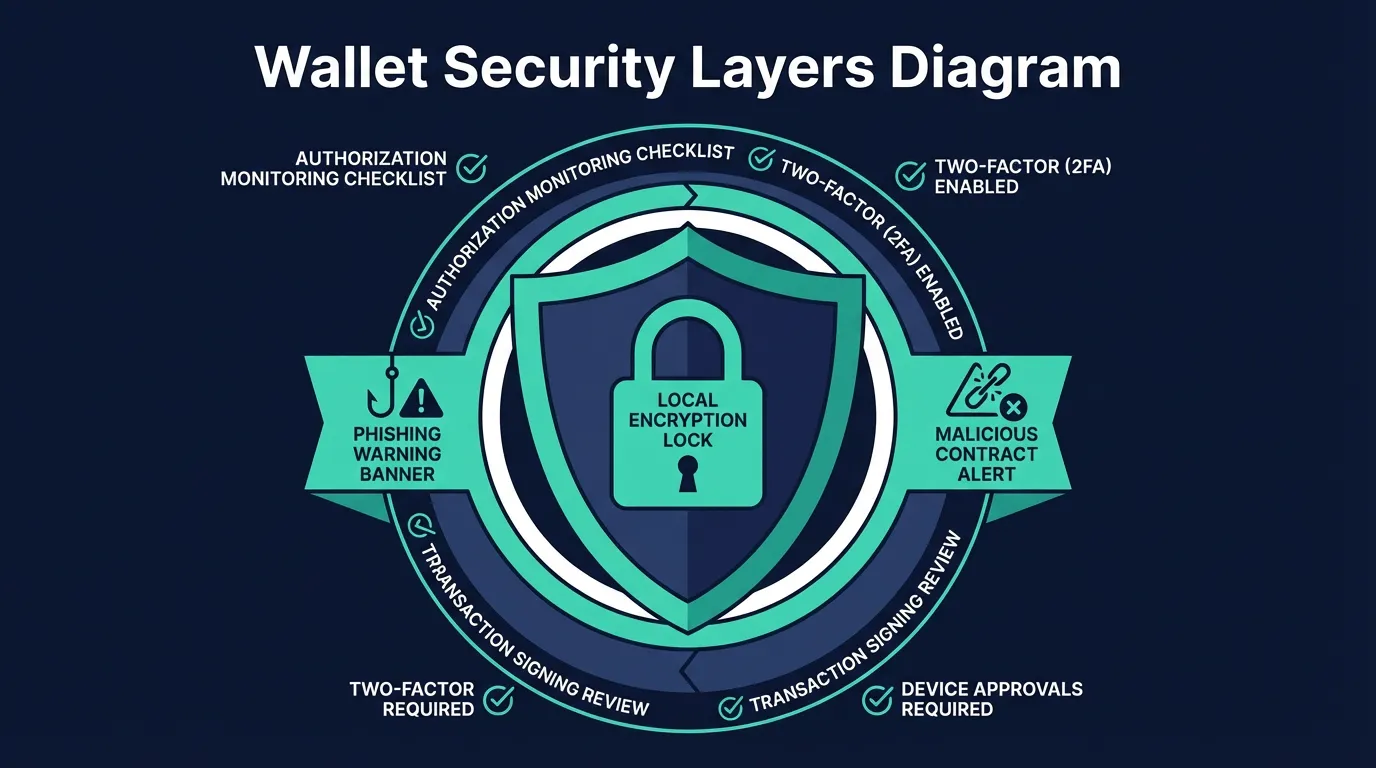
FoxWallet emphasizes locally encrypted storage and sandbox-style isolation concepts in its security architecture (see the FoxWallet Help Center documentation). - Multi-seed and multi-wallet support
Useful for separating long-term holdings from active accounts while staying in self-custody (documented in the FoxWallet Help Center account section). - Security signals for real-world threats
FoxWallet highlights phishing detection, high-risk signature verification, and authorization monitoring as part of its risk protection approach (see the FoxWallet Help Center and FoxWallet's official video materials on FoxWallet's YouTube channel).
Multi-chain BTC and USDT management without extra wallet sprawl
For many users, the practical problem is not just holding BTC or USDT. It is managing them across networks, apps, and addresses without losing track of what is where.
FoxWallet is designed as a multi-chain hub with:
- Native Bitcoin support
Official FoxWallet materials describe Bitcoin as one of the integrated mainnets, enabling direct use as a BTC wallet rather than relying only on wrapped representations (see the official overview video on FoxWallet's YouTube channel). - Broad chain coverage and unified asset visibility
FoxWallet's mobile listings and materials describe support spanning dozens of networks, along with unified views and on-chain synchronization (see the app listing on Google Play and the FoxWallet Help Center). - Multi-chain token support, including USDT across EVM ecosystems
As a multi-chain wallet, FoxWallet supports common token standards on major EVM networks where USDT is widely used (refer to the FoxWallet Help Center and Google Play listing).
Platform coverage is also a core part of usability:
- Mobile apps: FoxWallet on the App Store, and FoxWallet on Google Play
- Desktop use: FoxWallet also supports a browser extension experience shown in official tutorials on FoxWallet's YouTube channel
Built-in cross-chain swaps and on-chain trading (without extra hops)
Cross-chain usability is often where "multi-chain" wallets break down in practice. Users end up juggling bridges, swapping tools, and multiple interfaces, which increases both friction and error risk.
FoxWallet positions cross-chain capability as a core design pillar:
- Integrated cross-chain swap aggregators
FoxWallet documentation and product positioning describe built-in aggregation that supports cross-chain asset exchanges from inside the wallet interface (see FoxWallet and the FoxWallet Help Center). - Routing designed to improve pricing and reduce slippage
The product emphasis is on automatically routing for better liquidity outcomes, with a brand focus on lower swap fees and reduced hidden costs for users who swap frequently across chains.
This matters commercially because active users often feel cost pain in two places: repeated swap spreads and repeated operational mistakes. A wallet that reduces hidden costs and reduces steps can be a meaningful long-term advantage.

FoxWallet vs. common alternatives (feature-focused comparison)
The wallets below are frequently considered for BTC and stablecoin usage. The goal is to compare practical trade-offs, not to declare a one-size-fits-all winner.
| Criteria | FoxWallet | Binance Web3 Wallet | Trust Wallet | OKX Web3 Wallet | MetaMask |
|---|---|---|---|---|---|
| Custody model | Non-custodial (self-custody) | MPC-based, commonly described as keyless/seedless and more exchange-linked | Non-custodial | Self-custodial | Non-custodial |
| Native Bitcoin support | Yes (positioned as native) | Yes (per its product materials) | Yes | Yes | No (primarily EVM; BTC typically via wrapped assets) |
| Multi-chain asset management | Built around multi-chain and unified views | Strong multi-chain focus | Broad chain coverage | Very broad chain coverage | Strong on EVM networks; manual network management is common |
| Cross-chain swaps inside wallet | Core emphasis (aggregator integration) | Strong cross-chain focus | Available, varies by route | Strong routing/aggregation | Swap features available; cross-chain varies by setup |
| Security signals (phishing, approvals) | Emphasized in product docs and videos | Emphasized | Emphasized | Emphasized | Emphasized |
| Platforms | Mobile + browser extension | Typically within its app ecosystem + web/extension support | Mobile + browser extension | Mobile + extension + web | Mobile + browser extension |
If your top requirement is pure self-custody plus multi-chain and cross-chain usage in one place, FoxWallet is designed specifically around that combination.
For transparency, FoxWallet also references audits and open-source components via its official repositories and materials (see FoxWallet's GitHub and the official overview on FoxWallet's YouTube channel).
How to get started with FoxWallet (and what to do first)
A safe setup flow is part of the product experience, especially for buyers moving assets off exchanges.
- Install FoxWallet on your preferred platform
Use FoxWallet as the primary starting point, then choose mobile: App Store download or Google Play download. - Create a new wallet or import an existing one
Follow the self-custody account guidance in the FoxWallet Help Center. - Verify security basics before funding
Confirm your backup is correct, keep your recovery information offline, and pay attention to risk prompts for signatures and approvals. - Start with simple actions, then expand
Begin with receiving and sending, then explore swaps and DApps when you are ready, using the built-in browser and supported integrations (developer-facing details are in the FoxWallet developer documentation).
CTA: If you want a secure, non-custodial, multi-chain wallet experience that supports both mobile and desktop workflows, download FoxWallet and set up your wallet using the step-by-step guides in the FoxWallet Help Center.
