Best Hardware Wallets for Bitcoin

Choosing the best hardware wallet for Bitcoin is less about finding one universally superior device and more about matching the signing workflow to your priorities. Some people want a Bitcoin-only device with QR or microSD signing. Others need iPhone compatibility, a touchscreen, multisig support or a simpler first-time setup.
For most buyers, the strongest current options are COLDCARD Q or Mk5 for advanced Bitcoin-only workflows, Trezor Safe 7 for a polished touchscreen and broad connectivity, BitBox02 Nova Bitcoin-only for a compact mobile-friendly design, Blockstream Jade Plus for an open QR-based workflow, Keystone 3 Pro for a large-screen QR experience, Foundation Passport Prime for a premium open platform, and Ledger Flex for broad mobile compatibility.
A hardware wallet does not store Bitcoin itself. It generates and protects the private keys used to authorize transactions. Your Bitcoin remains recorded on the network, while the device helps keep signing keys away from an internet-connected phone or computer.
Best Bitcoin Hardware Wallets in 2026: Quick Comparison
| Device | Best suited to | Bitcoin-only option | Connectivity | Secure element / security model | Open-source status | Main trade-off |
|---|---|---|---|---|---|---|
| COLDCARD Q / Mk5 | Advanced Bitcoin users, multisig and offline PSBT workflows | Yes; Bitcoin-only by design | Q: QR, microSD, USB-C, NFC; Mk5: microSD, USB-C, NFC | Dual secure elements with user-verifiable signing workflows | Publicly reviewable source and reproducible builds; not a fully open hardware stack | Steeper learning curve; buyers must understand the 2026 seed-generation incident and migration guidance |
| Trezor Safe 7 Bitcoin-only | Buyers who want a touchscreen, mobile support and guided setup | Yes; separate Bitcoin-only edition | USB-C, Bluetooth and Qi2 wireless charging | TROPIC01 plus Optiga secure element and a separate MCU | Open-source software; some secure-element internals remain vendor-controlled | Wireless features add complexity; Safe 7 costs more than Safe 3 or Safe 5 |
| BitBox02 Nova Bitcoin-only | Compact Bitcoin storage with iPhone, Android and desktop support | Yes; factory-locked Bitcoin-only edition | USB-C and Bluetooth Low Energy | Dual-chip design with an EAL6+ secure chip | Open-source firmware and app with published hardware information; secure-chip internals are proprietary | No camera or QR workflow; microSD is used for backup, not transaction transfer |
| Blockstream Jade Plus | Users who prioritize an open QR/SD workflow and Bitcoin or Liquid support | Bitcoin and Liquid only | QR, SD card, USB-C and Bluetooth | No conventional secure element; uses Blockstream's blind-oracle security model | Open-source hardware and firmware | Security model differs from secure-element devices and may require more explanation for beginners |
| Keystone 3 Pro | Large-screen QR signing and users who want a dedicated Bitcoin firmware option | Yes; Bitcoin-only firmware available | QR and microSD; USB-C for charging, updates and optional use | Three secure elements with on-device verification | Firmware source is published; secure-element internals are hardware-specific | Larger device; QR mode still depends on careful address and transaction verification |
| Foundation Passport Prime | Buyers who want a premium open device with a large screen and broader secure-authority features | Bitcoin app available, but Prime is not a Bitcoin-only product | QR, USB-C, Bluetooth and NFC | Security processor plus secure element | Foundation describes its hardware and software as open source; the secure element remains proprietary | Premium positioning and broader scope; some advertised features, including full stateless mode, remain marked as coming soon |
| Ledger Flex | Mainstream mobile use, broad asset support and a clear E Ink touchscreen | No | USB-C, Bluetooth and NFC | EAL6+ secure element with a secure touchscreen | Device apps and parts of the stack are open; low-level OS and secure-element-dependent code are closed | Not Bitcoin-only and not fully open source; wireless and multi-asset scope may not suit strict minimizers |
The table is a decision guide, not a security score. A device can use a different architecture and still be a reasonable fit if its assumptions, recovery process and connection methods match your threat model.
How We Evaluated Bitcoin Hardware Wallets
This comparison uses current manufacturer product pages, firmware records and security documentation checked in November 2026. We prioritized factors that materially affect Bitcoin custody:
- whether keys are generated and kept on the device;
- whether transaction details can be verified on the device screen;
- Bitcoin-only firmware or a dedicated Bitcoin edition;
- QR, microSD, USB, Bluetooth and iPhone compatibility;
- backup and recovery options;
- multisig support and compatibility with established Bitcoin wallet coordinators;
- how much of the firmware and hardware can be independently reviewed;
- material security incidents, current firmware guidance and product status.
We did not rank devices by temporary promotions. Hardware-wallet prices vary by region, taxes, bundles and sales, so check the current manufacturer store before buying.
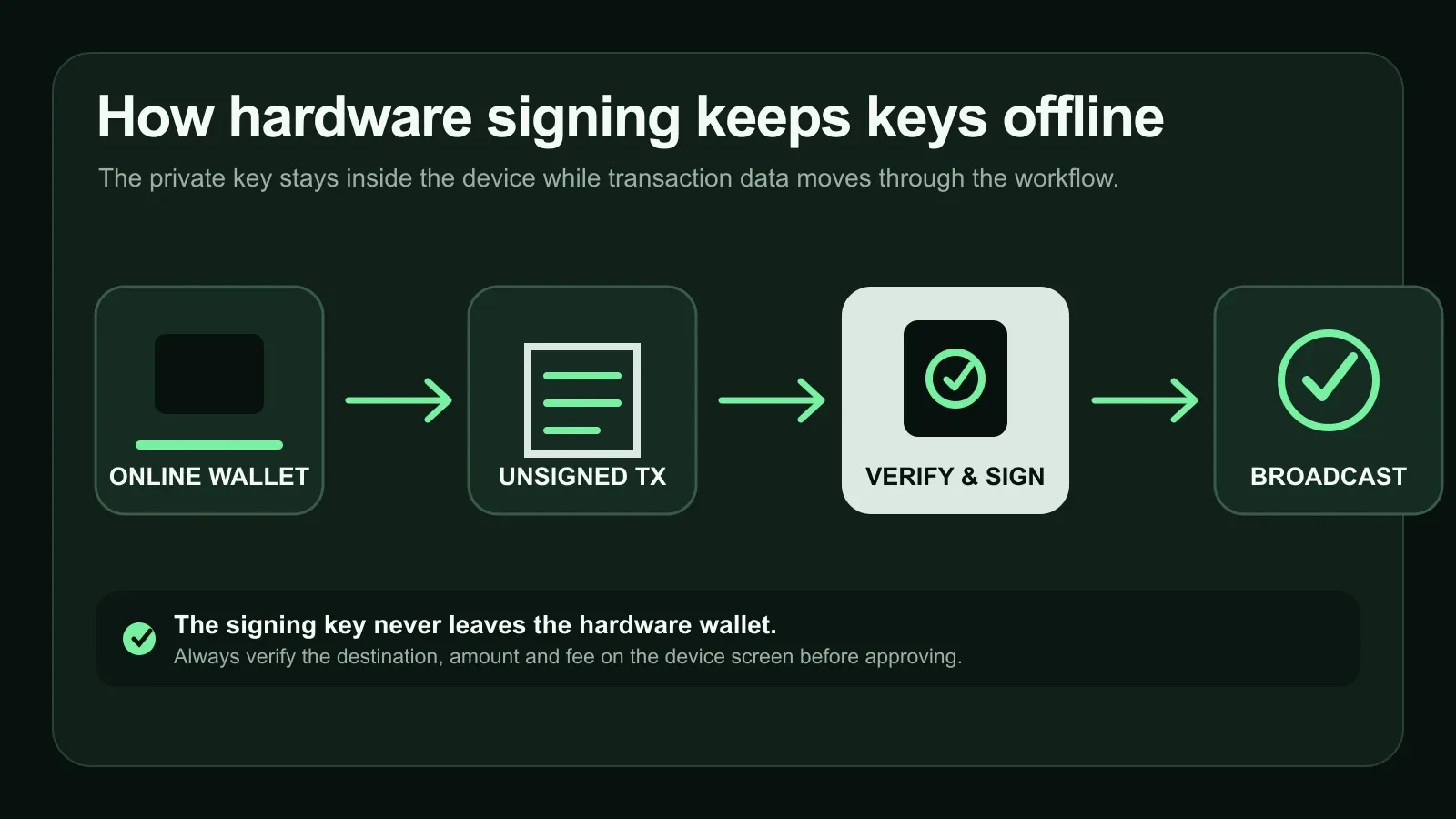
A hardware signer receives an unsigned transaction, shows the details for verification, signs internally and returns the signed transaction for broadcast.
1. COLDCARD Q and Mk5: Best Suited to Advanced Bitcoin-Only Workflows
COLDCARD remains a strong choice for experienced Bitcoin users who want Bitcoin-only firmware, microSD-based PSBT workflows and detailed control over multisig. The Q adds a larger color display, full keyboard, QR scanner and battery operation. The more compact Mk5 keeps microSD, USB-C and NFC in a smaller format.
Both models use dual secure elements and support workflows that can avoid connecting the signer directly to an online computer. COLDCARD publishes source for review and provides reproducible builds, although this should not be simplified into a claim that every component is fully open source.
The main trade-off is usability: COLDCARD exposes more Bitcoin-specific controls than many beginners need. Its 2026 seed-generation incident is also essential context. Coinkite disclosed that an entropy weakness affected seeds generated by impacted firmware between 2021 and July 2026. Fixed firmware prevents new affected seeds, but updating firmware does not repair an already weak seed. Anyone who generated a seed during the affected period should follow the current COLDCARD security guidance and migrate funds to a newly generated seed where required. Current buyers should verify the recommended firmware version on that status page before setup.
2. Trezor Safe 7 Bitcoin-Only: Best Suited to Touchscreen and Mobile Setup
Trezor Safe 7 is the current flagship in Trezor's lineup. Its separate Bitcoin-only edition removes non-Bitcoin coin support while retaining the 2.5-inch touchscreen, USB-C, Bluetooth, iOS and Android support, and Qi2 wireless charging.
The security design combines Trezor's TROPIC01 chip, an Optiga secure element and a separate microcontroller. Trezor's software is open source, but—as with other secure-element products—not every silicon-level implementation detail is open for inspection.
Safe 7 is the clearest fit for someone who wants a large, guided interface without giving up a Bitcoin-only option. Buyers who do not need wireless connectivity or the flagship display should also compare the lower-cost Safe 3 and touchscreen Safe 5. All still require careful on-device verification and a properly protected recovery backup.
3. BitBox02 Nova Bitcoin-Only: Best Suited to Compact iPhone and Desktop Use
BitBox02 Nova is the current generation of Shift Crypto's compact signer. The Bitcoin-only edition is locked to Bitcoin firmware at the factory, reducing the software scope for users who do not need other assets.
Nova connects by USB-C or Bluetooth Low Energy and supports iPhone, iPad, Android and desktop use. It uses a dual-chip architecture with an EAL6+ secure chip, while the firmware and companion app are open source and reproducible. The device also supports microSD backups.
The important limitation is that Nova is not a QR-signing device. Its microSD card is for backup rather than passing transactions between devices. That makes it a better fit for buyers who value a small, polished device and mobile compatibility over a visibly air-gapped camera workflow.
4. Blockstream Jade Plus: Best Suited to an Open QR Workflow
Jade Plus offers camera-based QR signing, SD-card support, USB-C and Bluetooth. It supports Bitcoin and the Liquid Network, and Blockstream publishes both the hardware and firmware as open source.
Instead of a conventional secure element, Jade uses a blind-oracle model designed to protect access to the device secret. That architecture is different rather than automatically stronger or weaker. Buyers should understand the availability assumptions and recovery process instead of comparing chip labels alone.
Jade Plus is the most full-featured current Jade. Blockstream also offers Jade Classic and Jade Core as simpler alternatives in the same family. The lineup shares the same broad firmware and security model, but connection and interface options differ, so check the current Jade lineup documentation before choosing.
5. Keystone 3 Pro: Best Suited to Large-Screen QR Signing
Keystone 3 Pro combines a four-inch touchscreen, camera-based QR signing, fingerprint input and three secure elements. A dedicated Bitcoin-only firmware option is available, which is preferable for buyers who want to minimize non-Bitcoin code on the device.
Its large screen helps with transaction review, and QR workflows can keep the signer logically separated from an internet-connected coordinator. Keystone publishes firmware source for review, while the secure-element internals remain hardware-specific.
The device is physically larger than most alternatives. “Air-gapped” also should not be treated as a guarantee: users still need to validate addresses, amounts and fees on the device, install firmware from official sources and protect the recovery backup. Check the current Keystone firmware page before use.
6. Foundation Passport Prime: Best Suited to a Premium Open Platform
Passport Prime is Foundation's current product generation and should not be confused with the older Passport Batch 2. Prime has a 3.5-inch touchscreen, camera, USB-C, Bluetooth, NFC and a security processor paired with a secure element. Foundation publishes its hardware and software as open source and provides a Bitcoin app with multisig, SeedQR and Taproot support.
Prime is broader than a conventional Bitcoin-only signer. Foundation positions it as a secure personal device for multiple identity and authority functions. That scope may appeal to buyers who want one premium platform, but it is not the right choice for someone seeking the smallest possible Bitcoin-only codebase.
Some product capabilities—including full stateless mode—are still labelled coming soon on Foundation's current product page. Evaluate Prime on features available now, not future roadmap claims, and review Foundation's published security audit alongside its response.
7. Ledger Flex: Best Suited to Mainstream Mobile Convenience
Ledger Flex uses a 2.8-inch E Ink touchscreen, USB-C, Bluetooth and NFC. Its secure touchscreen is useful for reviewing transaction details, and the device supports Bitcoin alongside a wide range of other assets. Ledger's current lineup also includes Nano Gen5 as a smaller touchscreen option.
Ledger uses an EAL6+ secure element. Its device apps and portions of the software stack are open, but low-level operating-system and secure-element-dependent code remain closed. Buyers should treat this as a trade-off rather than accepting either “fully open” or “fully closed” as an accurate description.
Flex is a reasonable fit for people who prioritize a polished phone connection and multi-asset support. It is less aligned with buyers who want Bitcoin-only firmware, QR signing or a fully reviewable stack.
What Actually Matters in a Bitcoin Hardware Wallet
On-device transaction verification
The device screen should show the destination address, amount and fee before signing. The phone or computer can be compromised, so the signer—not the coordinator screen—must be the final source of truth.
Key generation and backup
Understand where the seed is generated, which backup formats the device supports and how recovery works if the hardware is lost. A hardware wallet is replaceable; the recovery material is what ultimately restores control. See Private Key vs Seed Phrase: What's the Difference? for the underlying distinction.
Secure element and security model
A secure element can protect secrets against certain physical attacks, but its presence is not a complete security verdict. Some devices combine one or more secure elements with open firmware; others use a different architecture. Evaluate the complete design, update process and recovery model.
Open-source, source-available and proprietary components
“Open source” can refer to the companion app, firmware, hardware schematics or only selected device applications. Secure-element internals often remain proprietary. More reviewable code can improve auditability, but it does not eliminate implementation errors or unsafe setup.
Bitcoin-only firmware
A Bitcoin-only build can reduce code and features that are irrelevant to Bitcoin custody. It may be attractive to security minimizers, but multi-asset firmware is not automatically unsafe. The choice depends on what you actually need.
Multisig and wallet compatibility
If you plan to use multisig, verify that the signer works with the coordinator and policy you intend to use. Test recovery with small amounts before relying on a complex setup. Advanced features are only valuable when you can operate and recover them correctly.
Connection method
QR and microSD workflows reduce direct electronic connections, while USB and Bluetooth can be faster and easier. None removes the need for on-device verification.
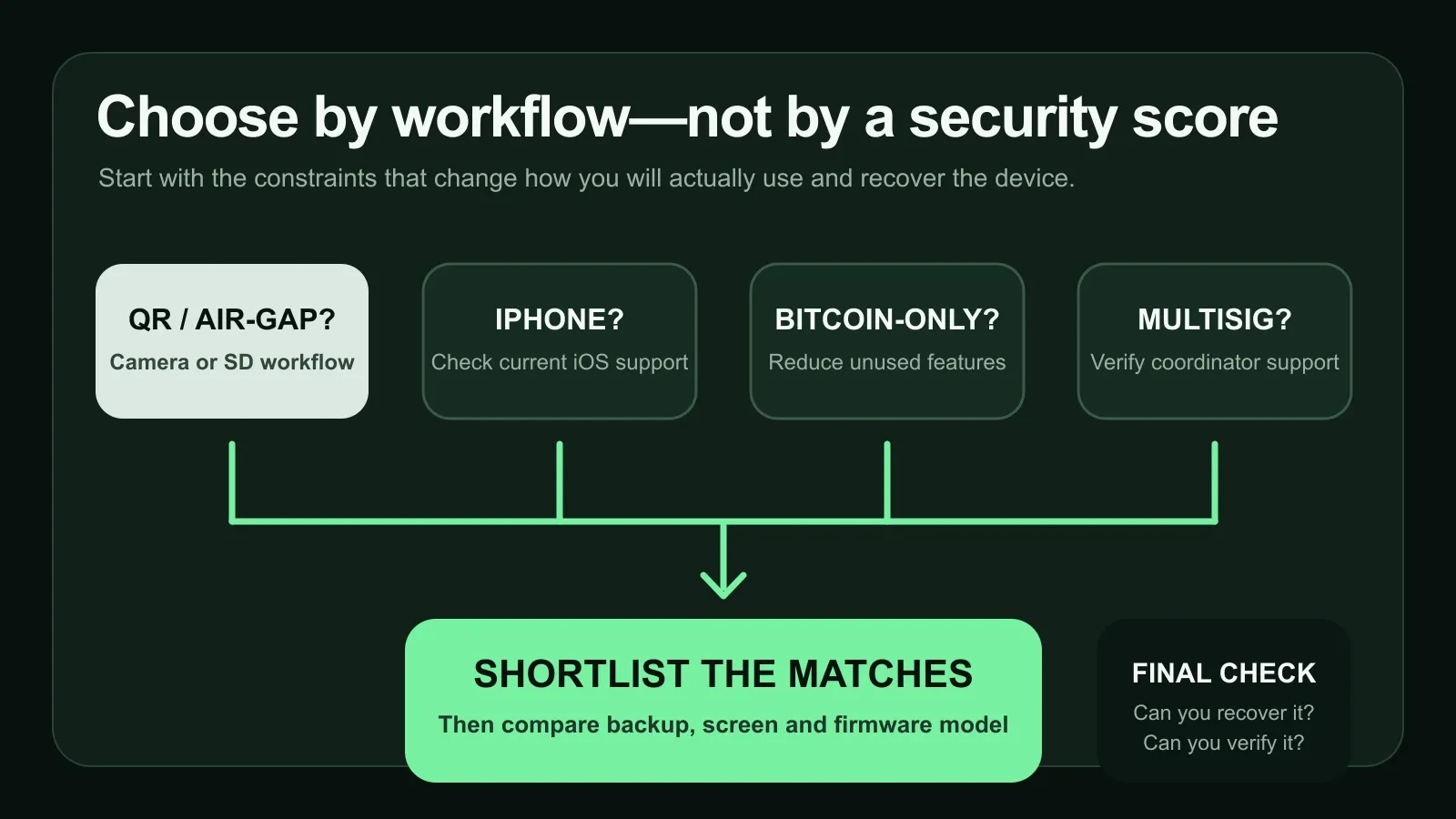
Start with the workflow you will actually use: connection method, phone compatibility, Bitcoin-only preference, multisig needs and interface comfort.
Air-Gapped vs USB vs Bluetooth Hardware Wallets
| Connection method | What it changes | Advantages | Trade-offs |
|---|---|---|---|
| QR | Transfers transaction data visually between the coordinator and signer | No data cable; easy to observe the transfer boundary | Camera and QR-parser complexity; slower for large transactions; still requires screen verification |
| MicroSD | Moves PSBT files on removable storage | Can keep the signer disconnected from the coordinator | Extra handling steps; card loss or mix-ups; not every wallet uses microSD the same way |
| USB | Direct wired connection | Fast, widely supported and usually simple | Creates a direct data path; cable and host compatibility matter |
| Bluetooth | Wireless phone connection | Convenient for mobile use | Larger connection surface and pairing complexity; users must still verify on-device |
An air-gapped workflow can reduce some attack paths, but it does not protect against a malicious transaction that the user approves without reading. A clear screen and disciplined verification matter as much as the transport.
Hardware Wallet Security Incidents and Firmware Updates
Hardware wallets are software-and-hardware systems, not permanent sealed appliances. Vulnerabilities can be found after release, and fixes may require firmware updates or—less commonly—moving funds to new keys.
The 2026 COLDCARD incident is a useful example. Coinkite said a seed-generation entropy weakness affected seeds created by impacted firmware from 2021 through July 2026. Current fixed firmware prevents new affected seeds, but a firmware update alone cannot strengthen a seed that was already generated with weak entropy. Potentially affected users must follow Coinkite's current migration guidance and create a new seed where required.
Before setting up any device:
- Check the manufacturer's current security and firmware page.
- Install only official firmware using the documented verification process.
- Confirm the device is authentic where the manufacturer provides a check.
- Read release notes for recovery or migration instructions—not just feature changes.
- Test the receiving and recovery workflow with a small amount before moving significant funds.
Do not ignore an advisory because the device still turns on. Conversely, an openly disclosed and fixed incident does not prove that every current unit is unsafe. The relevant question is whether your specific seed, firmware and setup are affected.
Using a Hardware Wallet Alongside an Active Software Wallet
Some users separate long-term reserves from funds used for everyday payments or on-chain activity. There is no universal percentage: the amount kept in each place should reflect transaction frequency, the consequences of loss, recovery competence and personal risk tolerance.
FoxWallet can serve as an active self-custody wallet for supported assets and networks, while a hardware wallet remains the separate signer for long-term Bitcoin custody. FoxWallet's mobile app has the broader multi-chain feature set. The browser extension is narrower, currently focused on EVM networks and Aleo, and does not provide the mobile app's Swap, Bridge or staking features. Neither should be presented as a replacement for a dedicated hardware signer.
For a detailed custody comparison, read Hardware Wallet vs Software Wallet: Which Should You Use in 2026? and Cold Wallet vs Hot Wallet: Which Is Better?.
How to Set Up a Bitcoin Hardware Wallet Safely
- Buy from the manufacturer or an authorized reseller. Inspect packaging and use the manufacturer's authenticity checks where available.
- Initialize the device yourself. Never use a recovery phrase supplied in the box, by a seller or by support staff.
- Install current official firmware. Read security notices before creating a seed.
- Write down the recovery words privately. Never photograph them, upload them, type them into a website or store them in cloud notes.
- Verify a receive address on the device screen. Do not rely only on the phone or computer.
- Send a small test amount first. Confirm that receiving, signing and recovery instructions make sense before moving more funds.
- Protect the backup against physical risks. Consider fire, water, theft, visibility, duplication and geographic separation. A metal backup may help with durability, but it is not universally required and can create its own discovery and theft risks.
- Plan inheritance and recovery. Document enough for an authorized person to recover funds without exposing the seed during normal use.
No legitimate wallet provider needs your recovery phrase. If someone offers to “validate” or “restore” a wallet by collecting it, stop. Review How to Spot a Crypto Wallet Recovery Scam before asking strangers for help.
FAQ
What is the best hardware wallet for Bitcoin?
There is no single best device for every user. COLDCARD Q or Mk5 suits advanced Bitcoin-only and multisig workflows; Trezor Safe 7 suits buyers who want a guided touchscreen and mobile support; BitBox02 Nova is a compact Bitcoin-only choice; Jade Plus and Keystone 3 Pro suit QR-based workflows; Passport Prime offers a premium open platform; and Ledger Flex prioritizes mainstream mobile convenience.
Is an air-gapped hardware wallet safer?
Air-gapped QR or microSD signing can remove a direct electronic connection between the signer and online coordinator. It reduces some attack paths, but it does not prevent approving the wrong address, installing malicious firmware or mishandling the recovery phrase. It is one security property, not a guarantee.
What happens if a hardware wallet is lost or damaged?
The Bitcoin is not stored inside the physical device. If you still have a valid recovery backup—and any required passphrase or multisig information—you can restore access using compatible hardware or software. Test the recovery process before relying on it, without exposing the real seed unnecessarily.
Is open-source firmware always safer?
Open-source firmware can be inspected and independently built, which improves auditability. It does not guarantee that every line has been reviewed or that the design has no flaws. Also check which components are open: firmware, app, hardware schematics and secure-element code are separate layers.
Should I choose a Bitcoin-only hardware wallet?
Bitcoin-only firmware can reduce code and eliminate features you do not use. It is a sensible choice for Bitcoin-focused storage, but it is not mandatory. A multi-asset device may be more practical if you genuinely need those assets and understand the broader attack surface.
Should all Bitcoin be kept on a hardware wallet?
Not necessarily. Many users separate long-term reserves from funds used regularly, but there is no responsible universal allocation. Decide based on transaction frequency, the potential loss from each wallet, recovery skill and the risks of maintaining multiple backups.
Final Takeaway
Choose the hardware wallet whose verification, connection and recovery workflow you can operate reliably. Advanced features do not help if they make backups or transaction review too confusing. Start with a small test, verify every transaction on the device screen and keep recovery material offline and private.
For strict Bitcoin-only control, compare COLDCARD, Trezor's Bitcoin-only edition, BitBox02 Nova Bitcoin-only and Keystone's Bitcoin firmware. For open QR workflows, Jade Plus and Passport Prime stand out for different users. For broad mobile convenience, Trezor Safe 7 and Ledger Flex are easier starting points. The right choice is the one whose assumptions and trade-offs you understand before significant funds are involved.