


Hardware Wallet vs Software Wallet: Which Should You Use in 2026?

Choosing between a hardware wallet vs software wallet comes down to two questions: Where should your signing keys live, and how often do you need to use them?
For everyday transactions and DApp access, a software wallet offers convenience. For long-term holdings, a hardware wallet can reduce exposure of private keys to your everyday phone or computer. If you need both, separate storage and activity wallets can be a practical approach, provided they use independently generated keys.
At FoxWallet, we build for convenient, non-custodial access to multiple blockchains. That makes us part of the software-wallet side of this comparison, not a replacement for dedicated hardware-key isolation.
This guide explains the tradeoffs, common mistakes, and practical choices for 2026. There is no universal winner or balance threshold. The right setup depends on the consequences of loss, your transaction habits, and your ability to manage recovery safely.
Understanding the hardware wallet vs software wallet difference
A crypto wallet does not physically contain your cryptocurrency. Assets and ownership conditions are recorded on blockchains. The wallet manages account information and the keys or signing interactions needed to authorize actions.
Ethereum's wallet overview provides a useful foundation: A wallet is your interface to an account, while protecting access remains essential.
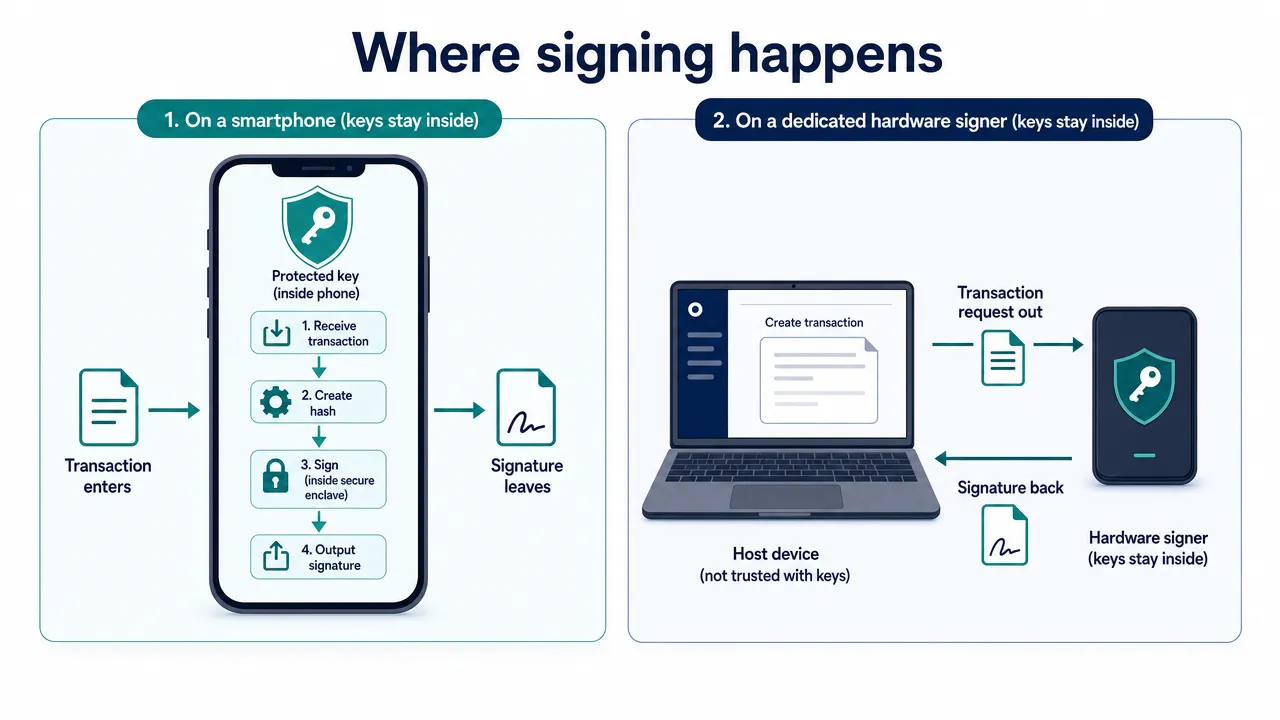
Where signing happens
A conventional software wallet generates, stores, and uses private keys within a general-purpose device, such as a phone or computer. Local encryption helps protect stored wallet data, but the device's operating system and application environment remain part of the security boundary.
A hardware wallet is a dedicated signing device. In its intended operation, private-key operations happen inside that device. A connected application prepares a transaction, the device asks you to approve it, and the signed transaction returns to the application for broadcasting.
The distinction is not simply "app versus device." A software interface can also work with a compatible hardware signer without holding its private keys.
For beginners, four terms matter:
- Private key: Secret material used to authorize actions.
- Recovery phrase: Backup material that can regenerate keys in supported wallet designs.
- Receiving address: Public information used to receive assets on the appropriate network.
- PIN or app password: Local access protection, not generally a substitute for recovery material.
Non-custodial means users retain control of their signing authority rather than handing it to a custodian. It does not mean that recovery, device security, or transaction review becomes someone else's responsibility.
Cold wallet vs hot wallet is a different distinction
The cold wallet vs hot wallet comparison describes key exposure and operating practices. Hardware versus software describes signing architecture.
An online software signer normally operates in a hot environment. A hardware wallet can keep keys isolated while communicating through a connected computer or phone. It is not necessarily air-gapped.
Likewise, a hardware-backed account used daily with DApps has different authorization exposure from a storage account that rarely signs anything.
Moving an already-exposed recovery phrase onto hardware does not erase its exposure history. Fresh hardware-generated keys followed by an on-chain transfer are different from restoring an existing software-wallet phrase onto a device.
A practical crypto wallet comparison
A useful crypto wallet comparison looks beyond token counts and interface design. It asks which risks each architecture reduces, what recovery requires, and whether the workflow fits your habits.
| Factor | Hardware wallet | Software wallet |
|---|---|---|
| Signing environment | Dedicated device designed to retain keys internally | Usually the phone or computer running the wallet |
| Key exposure | Reduces direct exposure to the connected host | Depends on device, operating system, and application protections |
| Setup | Adds sourcing, initialization, and device checks | Often starts on an existing device |
| Everyday access | Requires the signer for relevant approvals | Convenient for mobile and browser activity |
| Transaction review | Separate display can support verification | Interface may provide previews and warnings |
| Harmful approvals | Can still authorize them | Can still authorize them |
| Recovery | Requires compatible backup material and access | Requires compatible recovery material or another supported recovery path |
| Multi-chain support | Depends on device, firmware, and interface | Depends on application and platform support |
| Upfront cost | Device purchase and possible accessories | May avoid a dedicated signer purchase |
| Best-fitting priority | Reduced signing-key exposure | Convenient, frequent interaction |
Neither column represents every implementation. A software interface connected to hardware, for example, combines an application workflow with external signing.
Software wallet convenience in daily use
Software wallet convenience is most noticeable when you frequently check balances, send assets, switch networks, or interact with DApps.
A mobile application can keep these activities close at hand. A browser extension can simplify desktop interactions. Unified asset views reduce the need to navigate separate applications just to understand your holdings.
Convenience still requires deliberate review. Fewer navigation steps should not become fewer checks of recipients, permissions, or transaction effects.
Hardware adds physical confirmation steps. Those steps can be useful for infrequent storage transactions, but they may feel cumbersome during repeated activity. The best workflow is one you can follow carefully rather than routinely bypassing warnings.
Costs extend beyond the wallet
Hardware typically adds acquisition costs, possible shipping and taxes, backup materials, and eventual replacement. Software still depends on maintaining a secure, supported device.
Neither signing architecture inherently eliminates blockchain costs. Ethereum's explanation of gas distinguishes network execution fees from the interface used to submit a transaction.
Depending on the action, total costs may include:
- Network fees for transfers, approvals, and revocations.
- Service or protocol fees.
- Cross-chain routing, bridge, or relayer charges.
- Price impact and execution slippage.
- Destination-network fees for subsequent actions.
Slippage tolerance is a setting, not a guaranteed charge. Compare the expected output and minimum received, not just a headline fee.
For US users, check current availability, checkout totals, and any third-party service eligibility. This comparison does not establish universal regional access or current hardware prices.
Compatibility needs an exact check
"Supports the network" is not enough. Confirm the asset, token standard, device, operating system, application version, and intended operation.
Displaying an NFT does not necessarily mean every NFT approval or transfer workflow is supported. Similarly, viewing a balance does not prove that a replacement wallet can recover and spend from the same account.
Hardware wallet security and its limits
Hardware wallet security primarily addresses one important problem: Keeping signing secrets away from the everyday online device.
That benefit matters, but secure cryptocurrency storage also requires protection against harmful authorization, exposed backups, lost access, and protocol failures.
Private key protection is not transaction protection
Consider two different failures:
- An attacker steals a private key or recovery phrase and signs independently.
- A user approves an action that gives an attacker permission to move assets.
Hardware signing is designed to reduce the first pathway through the connected host. It does not automatically prevent the second.
A device may correctly sign exactly what you approved, even when the request grants an unwanted spending allowance. A misleading website, compromised interface, or unreadable request can still produce a harmful authorization.
A valid signature proves authorization, not that the transaction is safe.
Review the destination, asset, amount, network, and permissions. When a hardware display provides transaction details, compare those details with a trusted source. If the request cannot be understood, stop rather than treating the confirmation button as a security guarantee.
Gasless messages also deserve scrutiny. A message signature can carry consequences even when signing it does not immediately require a network fee.
Disconnecting does not revoke permissions
A DApp connection and an on-chain token allowance are different things.
Disconnecting a website can stop an interface session without removing permission previously granted to a contract. Where applicable, review and reduce or revoke unnecessary allowances separately.
Our approval management guide explains how to review and change supported token approvals. Check current network and platform coverage before relying on a particular workflow.
Revocation may require gas. It cannot reverse transfers already completed, and it cannot make an exposed recovery phrase safe again.
Backups can bypass the device's protections
A hardware wallet cannot protect recovery words that someone voluntarily enters into a fake website. Local software encryption cannot protect a backup exposed through an insecure screenshot or shared document.
Protect recovery material offline using a method appropriate to your physical environment. Consider theft, fire, water, accidental disposal, and unauthorized access.
Use the wallet's legitimate backup-check process where available. Never test a hardware recovery phrase by entering it into an online "seed checker."
Recovery formats also differ. Confirm the actual format, any required passphrase, and replacement compatibility before meaningful funding. A device PIN alone generally cannot restore lost keys.
Ethereum's security guidance reinforces the broader lesson: Device protection, careful authorization, and recovery discipline must work together.
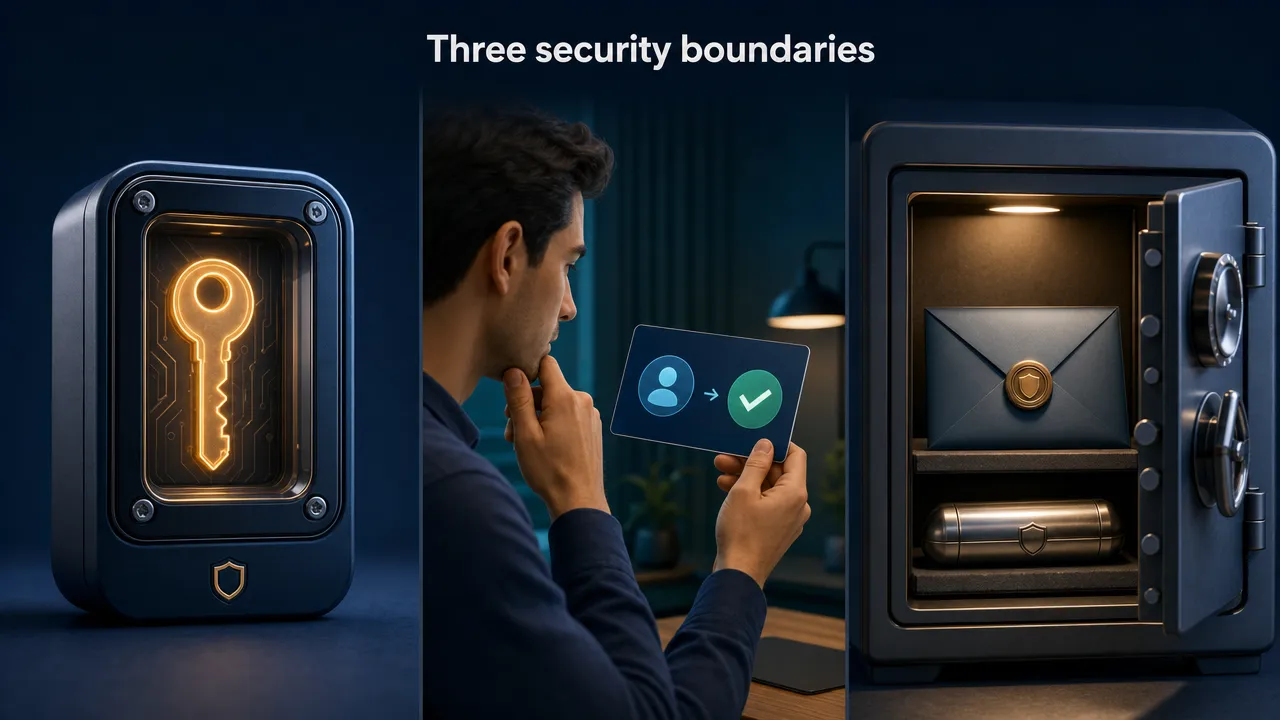
Which setup should you use in 2026?
Choose according to your activity and recovery readiness, not an arbitrary asset-value rule. An amount that feels manageable to one person may represent a serious loss to another.
Crypto storage for beginners
For crypto storage for beginners, a non-custodial software wallet can be a practical starting point when paired with limited initial funding and careful backup preparation.
Before adding meaningful funds, learn how to:
- Identify the correct receiving network.
- Protect and verify recovery material.
- Distinguish transfers from permissions.
- Recognize unexpected signing requests.
- Check transaction status without repeatedly resubmitting.
A hardware device is not mandatory for every beginner. However, if potential loss would have serious consequences, evaluating dedicated signing earlier may be sensible.
Do not mistake easier onboarding for reduced responsibility.
Long-term holders
If you rarely transact and your priority is reducing online key exposure, hardware-generated storage keys are often the better fit.
Buy through an authenticated official channel, follow authenticity checks, and initialize the device yourself. Never use a recovery phrase supplied pre-filled by a seller.
Plan for device failure and replacement before funding. Long-term storage also benefits from confidential recovery or inheritance instructions, so access does not depend on someone guessing a password.
Frequent DeFi and multi-chain users
Frequent activity favors accessible interfaces, understandable transaction reviews, and clear asset visibility.
Keep an activity wallet funded for foreseeable needs rather than automatically exposing your entire portfolio. Review permissions regularly, and assess each protocol separately.
Lending introduces risks such as collateral liquidation and contract failure. NFT interactions can include collection-wide permissions. Neither risk disappears because keys are well protected.
Cross-chain swaps require route-specific checks: Destination network, destination asset, minimum received, fees, and failure handling. Ethereum's bridge overview explains why moving value between networks can introduce additional trust and technical risks.
Staking is a separate activity. Evaluate its withdrawal conditions, provider arrangements, validator penalties where applicable, and contract risks independently.
Using both without copying the same seed
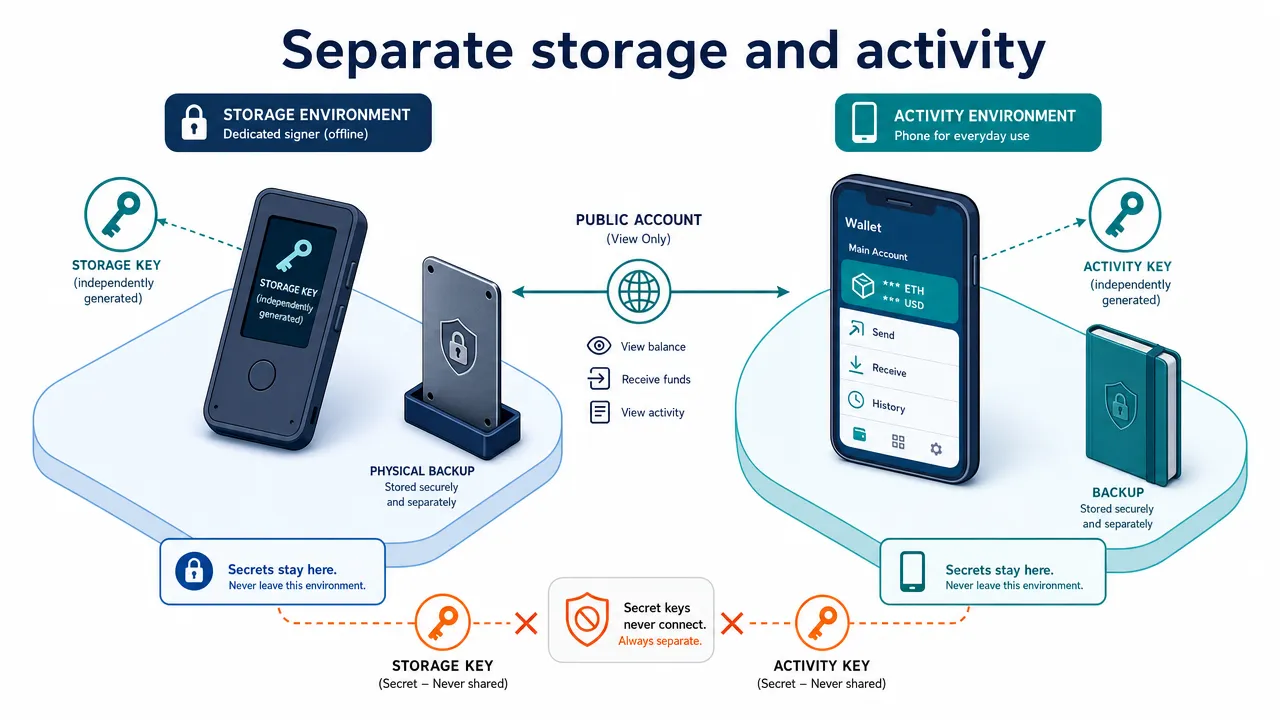
A combined setup can separate long-term storage from active use:
- Generate storage keys in the intended hardware environment.
- Create the software activity wallet independently.
- Protect and verify both recovery arrangements.
- Transfer only the assets needed for activity.
- Return surplus to a verified storage address when appropriate.
- Review activity-wallet permissions periodically.
Different accounts under one recovery phrase may separate balances and account-specific approvals, but they are not independent against theft of that phrase. Our account system documentation provides context for wallets and derived accounts; shared recovery material remains a shared risk.
Do not import a hardware recovery phrase into an online application to make access easier. That undermines the intended isolation.
A compatible hardware connection is different because it sends signing requests without importing the seed. Independently generated storage and activity wallets remain separately controlled, and ordinary on-chain transfers can move funds between them.
Where FoxWallet fits in your wallet strategy
FoxWallet is a decentralized, non-custodial software wallet designed for beginners through experienced Web3 users. Users retain control of their private keys and assets; we do not hold user funds.
Our focus is making multi-chain management and on-chain activity more accessible while providing software-based security controls.
Local key control and transaction awareness
FoxWallet supports locally encrypted storage of recovery phrases and private keys. On mobile, its security controls include sandbox isolation, contract recognition, pre-transaction risk alerts, and phishing-related protections.
These controls can support safer use, but they are not equivalent to dedicated hardware signing. They also cannot guarantee detection of every harmful contract or misleading request.
The FoxWallet FAQ explains the documented key-control model. Users remain responsible for protecting recovery material and understanding what they authorize.
Multi-chain management across mobile and desktop
FoxWallet offers iOS and Android apps as well as a more limited browser extension. On mobile, FoxWallet is a non-custodial multi-chain wallet with unified asset management, supported asset and NFT visibility, on-chain data synchronization, Discover/DApp access, Swap and Bridge where supported, and staking only on confirmed supported networks. These mobile capabilities aim to reduce operational complexity when holdings span different networks.
The browser extension has a narrower product scope. It supports EVM networks and Aleo for basic wallet actions, but it does not provide full mobile feature parity and does not include Swap, Bridge, or staking.
Check current platform, network, and feature support for your intended workflow. Network support does not by itself imply Swap, Bridge, or staking support, and asset detection should not be treated as proof that every token is legitimate or every operation is available.
Our multi-chain feature overview explains the product's approach to visibility and everyday management.
Integrated swaps and DApp access
On FoxWallet mobile, Swap and Bridge are separate capabilities. Swap uses 1inch on confirmed supported networks, while Bridge uses LI.FI on confirmed supported networks. Support for a network in FoxWallet does not automatically mean that Swap or Bridge is available on that network. Neither capability is available in the browser extension.
These integrations can simplify route access, but they do not establish the lowest fee or guaranteed savings. Compare the complete quote, expected output, minimum received, route, and destination-network requirements before approving.
FoxWallet mobile also includes a Discover/DApp browser for accessing and connecting to DApps across supported networks. A DApp's presence in Discover does not mean FoxWallet endorses it, partners with it, or guarantees its availability or safety. Lending, NFT, GameFi, and other functions depend on the individual DApp and network rather than being universal FoxWallet capabilities.
Staking is separate from Swap, Bridge, and DApp access. It is available on mobile only for confirmed supported networks and is not available in the browser extension. Integrated navigation does not remove required signatures, token approvals, network fees, or the need to assess each third-party protocol.
For beginners, the value is guided access and a cleaner mobile management workflow. For advanced and frequent users, it is consolidated multi-chain visibility and fewer unnecessary navigation steps where the relevant mobile feature is supported.
Final checklist and frequently asked questions
Before choosing or funding either wallet type, use this checklist:
- Start from an authenticated official website, not an unsolicited message or advertisement.
- Verify application publishers, extension permissions, and hardware authenticity.
- Create and protect recovery material before meaningful funding.
- Confirm the network, recipient, asset, amount, fees, and permissions before signing.
- Use a small test transfer when the destination or process is unfamiliar.
- Keep software and supported firmware updated through official channels.
- Review allowances and recovery readiness periodically.
- Treat suspected seed exposure as a key-compromise problem, not just an approval problem.
A successful test transfer does not validate a different address copied later. Repeat essential checks each time.
What is the best crypto wallet 2026 choice?
The search for the best crypto wallet 2026 has no single defensible answer.
Choose software for convenient activity, hardware when reducing signing-key exposure is the priority, and independently generated storage and activity keys when both needs matter. Recovery competence and exact compatibility are part of the choice.
What happens if my phone or hardware wallet is lost?
Losing the device does not necessarily mean losing the assets. Compatible recovery material can restore access.
If every valid signing and recovery path is lost, however, a non-custodial wallet provider generally cannot recreate your keys. A PIN or app password alone is not a replacement backup.
Can I make an existing software-wallet seed cold?
Taking it offline does not undo earlier exposure. For a stronger separation, generate fresh keys in the intended secure environment and transfer assets to their verified addresses.
Restoring the old seed onto hardware changes where future signing happens, not where that seed may previously have been exposed.
Does hardware reduce transaction fees?
Not inherently. For an equivalent transaction, network execution costs do not fall simply because hardware signs it. Different routes, fee settings, services, and transaction types can change the total.
What should I do next?
Choose your signing architecture first, then the interface that fits your activity. Avoid adding complexity you cannot maintain safely.
If convenient, non-custodial multi-chain access matches your needs, explore FoxWallet and read our wallet security precautions before funding.
The strongest hardware wallet vs software wallet decision is not about choosing a supposedly risk-free category. It is about understanding your exposure, protecting recovery, and consistently verifying what you sign.