


How to Get a Secure Crypto Wallet (Step-by-Step)

What a crypto wallet is (and what it is not)
A crypto wallet is a tool (usually an app or browser extension) that manages the cryptographic keys you use to access and move assets on a blockchain. Importantly, your coins are not stored “inside” the app. Your assets remain on-chain, and the wallet stores the credentials that let you authorize transactions. A simple definition is that a wallet “stores public and/or private cryptographic keys used for cryptocurrency transactions” (see: https://en.wikipedia.org/wiki/Cryptocurrency_wallet).
At a high level, every wallet revolves around two concepts:
- Public address: Share this to receive funds (like an account number).
- Private key or seed phrase: Keep this secret. Whoever controls it can authorize spending.
If you take away one security idea from this guide, make it this: protecting your seed phrase is protecting your assets.
Wallet types and which is safest
Most people searching for a secure setup are choosing between three practical options:
1: Custodial wallet (exchange account)
- The provider holds the keys for you.
- Easy recovery, but you trust a third party’s security and solvency.
- Non-custodial software wallet (hot wallet)
2: Non-custodial software wallet (hot wallet)
- Your keys stay with you, on your device.
- Best for Web3 activity like DeFi and DApps, but you must handle backups carefully.
3: Hardware wallet (cold wallet)
- Keys are kept offline on a dedicated device.
- Strong protection against online attacks, best when your holdings grow.
FoxWallet is a non-custodial, multi-chain software wallet built for both beginners and advanced users, with mobile apps and a browser extension, local key encryption, and risk alerts (https://foxwallet.com).
Hot vs cold usage (why most users start with hot wallets)
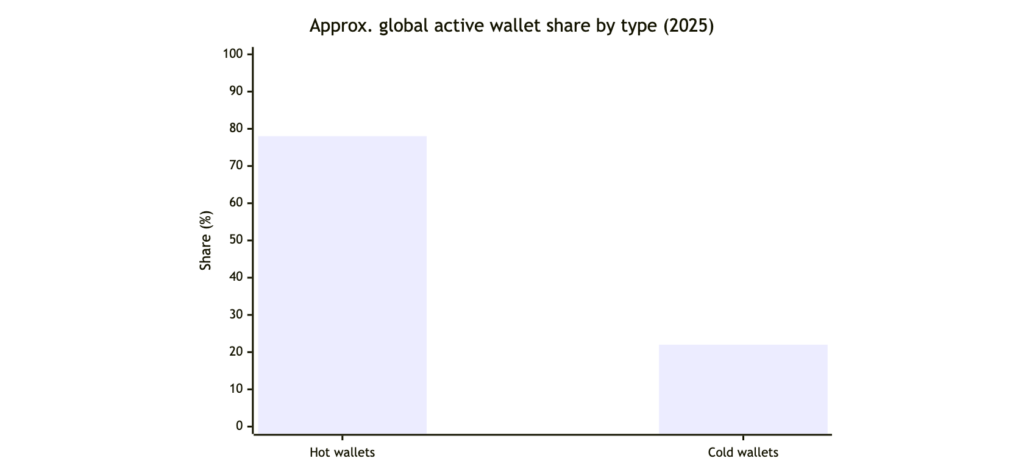
Practical takeaway: a hot wallet is often the first step, and your job is to set it up with the same discipline you would use for a cold wallet backup.
Security threats and baseline safety rules
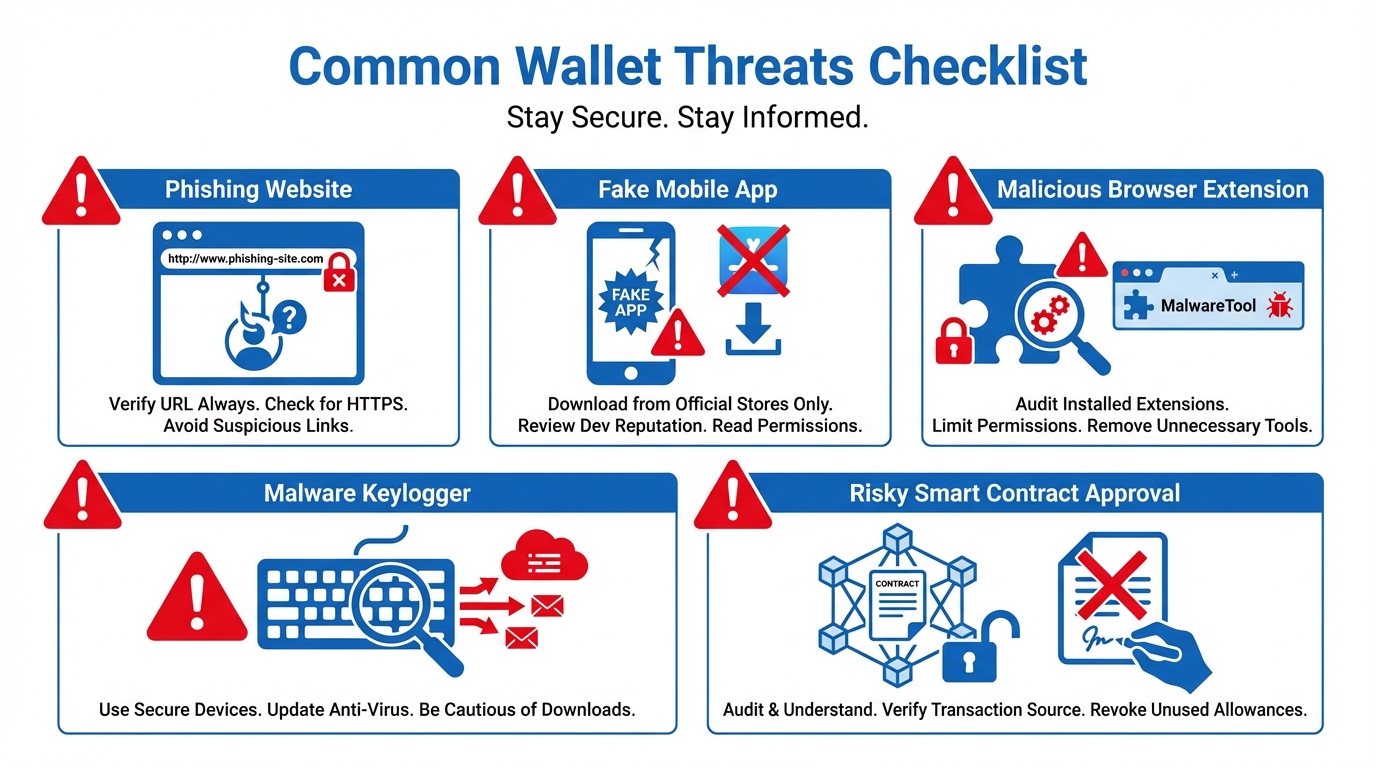
Most real-world wallet losses happen because of avoidable threats, not because the blockchain “broke.” Common risks include phishing sites, fake apps, malicious extensions, malware, social engineering, and signing risky smart-contract approvals. Fidelity’s overview of wallet safety aligns with this focus on phishing and key protection (https://www.fidelity.com/learning-center/trading-investing/crypto/crypto-wallet), and Coincover highlights how recovery and seed handling can define outcomes when something goes wrong (https://www.coincover.com/blog/why-wallet-recovery-will-define-crypto-adoption-in-2026-coincover).
Baseline rules that dramatically reduce risk:
- Never share your seed phrase, not with support, not with friends, not with “verification” pages.
- Never store the seed phrase in screenshots, cloud drives, email drafts, or chat apps.
- Download only from official sources, and bookmark the real domain to avoid lookalikes.
- Keep your phone and browser updated, and avoid unknown extensions or cracked software.
- Treat every signature request as spending authority, because sometimes it is.
FoxWallet adds security-focused UX protections like pre-transaction risk alerts and smart contract recognition, designed to help you catch suspicious interactions before you confirm them.
Checklist: how to choose a secure wallet
Use this checklist to evaluate any wallet, especially if you are new to self-custody.
| Category | What to look for | Why it matters |
|---|---|---|
| Key control | Non-custodial, you control the seed phrase | True ownership, no third party can move funds |
| Local protection | Local encryption of keys, app lock, device security | Reduces theft risk if your device is compromised |
| Risk tooling | Transaction warnings, phishing protection, contract recognition | Helps prevent “one bad signature” losses |
| Multi-chain management | Clear network selection, unified asset view | Reduces wrong-network sends and confusion |
| DeFi and DApps | Safe DApp access and clear permission prompts | Safer daily Web3 usage |
| Platform coverage | iOS, Android, browser extension | Lets you keep one consistent workflow |
| Cost clarity | Transparent swap and network fees | Avoids hidden costs over time |
FoxWallet is positioned strongly for this checklist: it is non-custodial, emphasizes locally encrypted key storage, supports multi-chain asset management with unified views, and provides risk alerts and phishing protections (https://foxwallet.com).
Step-by-step: get FoxWallet and lock it down
This walkthrough is wallet-agnostic, but uses FoxWallet as the running example.
Step 1: Verify you are using official links
Before installing anything, confirm you are on official pages:
- FoxWallet site: https://foxwallet.com
- FoxWallet Help Center “Official Links”: https://hc.foxwallet.com/docs/official-links
This step prevents the most common beginner mistake: installing a fake app that steals your seed phrase.
Step 2: Install from a verified app store listing
Use one of the official listings:
- iOS (US App Store): https://apps.apple.com/us/app/foxwallet-secure-crypto-asset/id1590983231
- Android (Google Play): https://play.google.com/store/apps/details?id=com.foxwallet.play&hl=en_US
If you plan to use a browser extension, start from the official FoxWallet site and official links page above, not from search ads.
Step 3: Create a new wallet (do not import yet)
Choose “Create new wallet” unless you already have a seed phrase you trust. Create a strong local passcode or password and enable biometrics if available.
Why this matters: your password protects access to locally encrypted wallet data on your device, but it cannot replace the seed phrase backup.
Step 4: Back up your seed phrase offline
When the wallet shows your recovery phrase:
- Write it down on paper (or a durable offline medium).
- Copy it exactly and in the correct order.
- Store it in a secure place that is not online.
- Consider making two copies stored in separate secure locations.
Do not take a screenshot. Do not paste it into notes. If someone sees it, they can take everything.
Step 5: Turn on security settings and get comfortable reading prompts
Enable app lock, set auto-lock to a short time window, and keep your device OS updated. When you later interact with DApps, read transaction prompts carefully.
FoxWallet’s risk alerts and contract recognition are designed to help you spot suspicious prompts before signing.
Step 6: Receive a small test transfer first
To receive crypto:
- Choose the correct chain inside the wallet.
- Copy the address and paste it into the sender (for example, an exchange withdrawal page).
- Double-check the network matches the address type.
- Send a small test amount first, then send the remainder.
This habit prevents wrong-network transfers and address mistakes.
Step 7: Connect to DApps carefully
If you use DeFi or NFTs, connect only to DApps you trust. Review requested permissions and avoid giving unlimited approvals unless you understand the risk.
For desktop Web3 usage, FoxWallet supports an Ethereum provider interface for DApp connectivity (https://hc.foxwallet.com/docs/ethereum/provider).
Step 8: Maintain hygiene over time
- Update the wallet app and extension regularly.
- Periodically review and revoke old token approvals when you no longer use a DApp.
- Consider a hardware wallet later for large, long-term holdings.

FoxWallet vs MetaMask vs Trust Wallet vs OKX Web3 Wallet (quick comparison)
All four options below are non-custodial wallets, meaning you control the keys. The right choice depends on how multi-chain your life is, how often you use DApps, and how much you value built-in risk tooling.
| Feature | FoxWallet | MetaMask | Trust Wallet | OKX Web3 Wallet |
|---|---|---|---|---|
| Non-custodial self-custody | Yes | Yes | Yes | Yes |
| Multi-chain breadth | Strong focus, multi-chain by design | Strong on Ethereum and EVM networks | Broad multi-chain support | Broad multi-chain support |
| Built-in swaps | Integrated aggregation and routing | In-wallet swaps (primarily EVM) | Aggregation via partners | Strong aggregation and routing |
| DApp access | Built-in DApp access + extension support | Very widely supported in EVM DApps | DApp browser + extension | DApp browser + extension |
| Security emphasis | Local encryption, risk alerts, phishing protection | Strong education, widely used | Security scanner features | Risk detection features, multiple security options |
| Best fit | Users who want secure multi-chain management and efficient on-chain activity | Ethereum/EVM-first users who want maximum DApp compatibility | Mobile-first users who want broad chain support | Users who want a powerful multi-chain suite |
If your priority is a security-first, non-custodial wallet built around multi-chain asset management, with mobile and extension support and risk alerts, FoxWallet is a strong default starting point (https://foxwallet.com). For safest installation, always cross-check the official links page before downloading (https://hc.foxwallet.com/docs/official-links).